
BLOG
rTasks: Features That Boost Team Collaboration


In today’s fast-paced work environment, effective team collaboration is more essential than ever. Whether you’re working remotely or in a traditional office setting, the ability to communicate and coordinate tasks efficiently can make or break a project. Teams that collaborate well tend to be more productive, innovative, and engaged. So how do you foster this collaborative spirit? Enter rTasks—a powerful tool designed specifically for enhancing teamwork.
With its suite of features tailored for seamless communication and organization, rTasks empowers teams to boost their efficiency and achieve their goals together. Let’s dive into what makes rTasks an invaluable asset for any organization looking to elevate its collaborative efforts!
What is rTasks?
rTasks is a powerful project management tool designed to enhance team collaboration. It streamlines workflows and keeps everyone connected, regardless of where they are.
At its core, rTasks offers a user-friendly interface that simplifies task assignment and progress tracking. Teams can effortlessly create projects, set deadlines, and allocate responsibilities.
One standout feature is its ability to adapt to various industries. Whether you’re in tech, marketing, or healthcare, rTasks provides customizable solutions that fit your team’s unique needs.
With cloud-based functionality, access is seamless from any device. This means real-time updates are just a click away—keeping your team aligned and informed at all times.
By integrating various tools and applications into one platform, rTasks reduces the need for multiple software systems while enhancing productivity across the board. It’s truly built with modern collaboration in mind.
Top features of rTasks for team collaboration
rTasks offers a suite of features designed specifically to enhance team collaboration. One standout is its real-time task updates, which ensure everyone stays in the loop. Team members receive instant notifications about changes or comments on tasks, promoting a responsive work environment.
Another essential feature is integrated communication tools. Whether through chat functions or comment threads directly on tasks, rTasks keeps conversations organized and context-specific. This minimizes miscommunication and allows teams to collaborate efficiently.
Project organization takes center stage with customizable boards and lists that adapt to your workflow needs. You can easily segment projects into manageable parts for better tracking.
Additionally, rTasks seamlessly integrates with other popular apps like Slack and Google Drive, making it easier than ever to streamline processes across different platforms. These integrations foster synergy among various tools while maintaining focus on collective goals within the team.
Real-time task updates and notifications
Real-time task updates and notifications are game-changers in team collaboration. With rTasks, every member stays informed about changes as they happen. This feature eliminates confusion and ensures everyone is on the same page.
Instant alerts keep teams agile. If a deadline shifts or a new comment appears on a task, team members can respond quickly, reducing delays. The clarity this brings fosters accountability and boosts productivity.
Moreover, customizable notification settings cater to individual preferences. Some may want instant updates for critical tasks while others might prefer daily summaries. This flexibility helps maintain focus without overwhelming users with constant pings.
With real-time insights at their fingertips, teams can make quicker decisions and adapt strategies seamlessly. It’s not just about staying updated; it’s about enhancing overall workflow efficiency across projects.
Team communication tools
Effective communication is the backbone of successful teamwork. rTasks offers a suite of tools designed to enhance interaction among team members.
Instant messaging allows for quick exchanges, making it easy to address queries and share ideas on the fly. No more waiting for emails that may get lost in busy inboxes.
Discussion boards foster deeper conversations around projects or topics. Team members can engage in meaningful dialogues without time constraints, ensuring everyone’s voice is heard.
Video conferencing integrations bring remote teams together visually. This feature humanizes interactions and helps build rapport, even from afar.
With file sharing capabilities, collaborating on documents becomes seamless. Teams can access important files instantly, reducing confusion and streamlining workflows.
These communication tools within rTasks transform how teams connect and collaborate daily. They lay the groundwork for a cohesive work environment where ideas flourish.
Project organization and management
Effective project organization and management are crucial for any successful team. rTasks excels in providing tools that streamline these processes.
With a user-friendly interface, teams can easily create and assign tasks. Each task can have specific deadlines, priorities, and descriptions to ensure clarity. This level of detail keeps everyone on the same page.
Moreover, users can categorize projects into folders or boards. This visual approach helps track progress at a glance. Teams can see what’s pending, in progress, or completed without sifting through endless emails.
Collaboration becomes seamless with shared calendars and timelines integrated into the platform. Team members stay informed about upcoming milestones while managing their individual responsibilities effectively.
The ability to set recurring tasks also enhances productivity over time. It allows teams to focus on strategic goals rather than getting bogged down by routine activities. With rTasks, project management transforms from chaotic to organized effortlessly.
Integrations with other apps and platforms
Integrating rTasks with other apps and platforms is a game-changer for teams seeking seamless workflow. This capability allows users to connect their favorite tools, enhancing productivity across various tasks.
Whether it’s linking project management software or communication apps, the integration options are vast. Teams can synchronize schedules from calendar applications or merge file-sharing services for easy access to documents.
Such connections streamline processes and reduce time spent switching between different interfaces. With everything in one place, team members stay focused on what matters most: collaboration and execution.
Moreover, these integrations promote transparency within teams. Everyone has real-time access to updates across multiple platforms, ensuring that no one is left out of the loop. This level of connectivity fosters a harmonious working environment where efficiency thrives without unnecessary hurdles.
Case studies of successful team collaboration using rTasks
Case studies illustrate the power of rTasks in enhancing team collaboration across various industries.
One notable example comes from a marketing agency that struggled with project deadlines and communication gaps. After adopting rTasks, they experienced a 30% increase in on-time project completion. The real-time updates allowed team members to stay aligned, reducing miscommunication.
Another case involved a software development company facing challenges with task management. By utilizing rTasks’ organization features, they streamlined workflows significantly. This led to faster iterations and improved overall productivity.
A non-profit organization also benefited from rTasks by integrating it with their existing tools for fundraising events. Their teams collaborated seamlessly across different locations, resulting in successful campaigns that exceeded their goals.
These examples demonstrate how diverse organizations can leverage rTasks to enhance teamwork and achieve outstanding results.
Conclusion: Why rTasks is the ultimate tool for boosting team collaboration in any organization
When it comes to enhancing team collaboration, rTasks stands out as a powerful tool. Its design focuses on improving communication and streamlining project management for teams of all sizes. With features like real-time task updates, seamless integrations, and dedicated communication tools, rTasks ensures that everyone is on the same page.
Moreover, its organizational capabilities make tracking projects effortless. Teams can prioritize tasks effectively and ensure deadlines are met without confusion or delays. The success stories from organizations using rTasks highlight its efficacy in transforming teamwork dynamics.
Choosing rTasks means embracing a solution that promotes efficiency and productivity across any organization’s landscape. It’s not just about managing tasks; it’s about fostering an environment where collaboration thrives effortlessly. As businesses continue adapting to changing work landscapes, having robust tools like rTasks will undoubtedly be key in achieving collective goals.

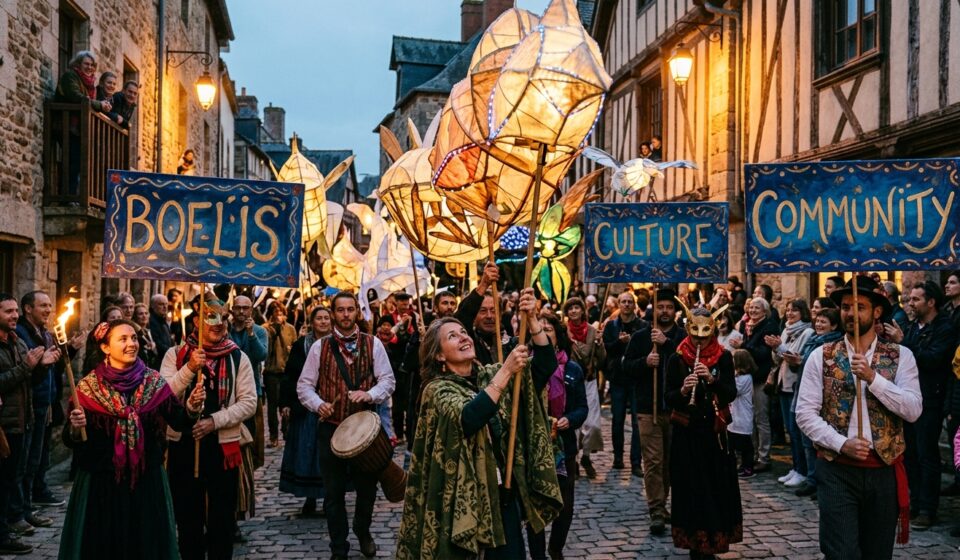
Discover the captivating world of Boelis, where tradition meets creativity. This unique art form weaves together history and modernity, offering a fresh perspective on design that resonates with both enthusiasts and newcomers alike. From its rich origins to its contemporary adaptations, Boelis is more than just an aesthetic; it’s a journey through culture and craftsmanship.
Imagine stepping into spaces adorned with intricate patterns that tell stories from generations past while embracing today’s innovative spirit. Whether you’re an architect looking for inspiration or a homeowner eager to infuse your space with character, understanding Boelis can transform your approach to design. Join us as we delve deeper into this fascinating practice and explore how you can bring its essence into your own home!
History and Origins of Boelis
The art of Boelis traces its roots back centuries, evolving from ancient traditions. Initially birthed in small villages, artisans perfected techniques passed down through generations.
Crafted with precision, early Boelis pieces showcased regional materials and motifs. These creations often reflected the community’s values and beliefs.
As trade routes expanded, so did the influence of Boelis. It absorbed elements from various cultures while maintaining its unique identity. This blend enriched the aesthetic appeal and functionality of each piece.
By the late 19th century, a resurgence occurred as artists sought to revive traditional crafts amidst industrialization’s rise. The desire for authenticity led to renewed interest in these timeless methods.
Today, understanding this history offers insight into why contemporary designers are drawn to Boelis’ charm and craftsmanship. Each creation carries whispers of its past, connecting modern enthusiasts to an enduring legacy.
Traditional Techniques Used in Boelis
Boelis is steeped in rich traditions that showcase craftsmanship. Artisans rely on time-honored methods to create unique pieces.
One prominent technique involves hand-weaving textiles using natural fibers. This process not only highlights the skill of the weaver but also preserves cultural heritage.
Ceramics play a significant role, with intricate glazing methods passed down through generations. Each piece tells a story rooted in tradition.
Woodworking is another vital aspect. Craftspeople shape and carve wood into functional art, using tools that have remained largely unchanged over centuries.
These traditional techniques are more than just skills; they represent community bonding and shared knowledge. As artisans continue to practice these methods, they maintain an invaluable connection to their roots while enriching contemporary aesthetics in Boelis designs.
Modern Interpretations of Boelis
Modern interpretations of Boelis have breathed new life into this rich tradition. Designers today are blending traditional elements with contemporary aesthetics, creating a fresh dialogue between old and new.
Incorporating sleek lines and minimalistic designs, modern Boelis often features innovative materials alongside classic ones. Think of glass juxtaposed with traditional wood or metal accents that enhance the overall structure.
Color palettes have evolved as well. While earthy tones remain popular, bold colors now make appearances, adding vibrancy to spaces once dominated by muted hues.
Artists and architects are also experimenting with scale. This flexibility allows for larger installations that maintain the essence of Boelis while appealing to modern sensibilities.
These adaptations not only honor historical roots but also resonate in urban settings where tradition meets innovation seamlessly.
Impact and Influence on Contemporary Design
Boelis has carved a niche in the realm of contemporary design. Its rich history informs modern aesthetics, blending tradition with innovation.
Designers today are inspired by Boelis’s intricate patterns and textures. These elements add depth to minimalist spaces, creating visual interest without overwhelming the senses.
The fluidity of Boelis allows it to adapt across various styles. From sleek urban apartments to rustic country homes, its versatility is unmatched.
Moreover, sustainability plays a significant role in its influence. Many artisans incorporate eco-friendly materials into their work, reflecting a growing trend towards responsible design practices.
Social media platforms showcase stunning interpretations of Boelis worldwide. This exposure fosters appreciation for craftsmanship and encourages new generations to explore these techniques further.
As artists experiment with color palettes and forms rooted in Boelis traditions, they breathe fresh life into this age-old art form. The dialogue between past and present continues to shape our built environment beautifully.
Examples of Boelis in Architecture and Interior Design
Boelis manifests beautifully in various architectural styles and interior design elements. One stunning example is the use of intricate tile work, often found in Mediterranean-inspired homes. These tiles showcase vibrant colors and patterns that breathe life into spaces.
In contemporary architecture, Boelis influences clean lines paired with traditional motifs. This fusion creates an inviting yet modern atmosphere, appealing to diverse tastes.
Interior designers also embrace Boelis through textiles like handwoven rugs or embroidered cushions. These details add warmth and character to any room.
Additionally, restaurants and cafes are incorporating Boelis-inspired decor to create unique dining experiences. The blend of cultural heritage with modern aesthetics draws patrons seeking something special.
Even outdoor spaces reflect this style through garden layouts that emphasize natural beauty while integrating artistic structures. Each element tells a story rooted in tradition yet resonates with today’s lifestyle choices.
Steps to Incorporate Boelis into Your Home
Incorporating Boelis into your home begins with understanding its essence. Start by selecting a color palette that reflects the rich tones often seen in traditional pieces. Deep greens, earthy browns, and vibrant reds can set the stage.
Next, consider textures. Opt for materials like handwoven fabrics or rustic wood elements to create depth. These details bring warmth and authenticity.
Accessorizing is key; think about adding handcrafted pottery or woven baskets that embody Boelis craftsmanship. Such items add character to any space.
Lighting plays an important role too. Choose fixtures that echo traditional designs but offer a modern twist—perhaps lantern-style sconces or artisanal pendant lights.
Don’t shy away from mixing old and new styles. Pair contemporary furniture with vintage Boelis art for a striking contrast that honors tradition while celebrating innovation.
Interview with a Boelis Expert
I had the pleasure of speaking with Maria Torres, a renowned expert on Boelis. Her passion for this art form is palpable.
She described how traditional techniques are passed down through generations. Each artisan brings their unique touch to the process, making every piece one-of-a-kind.
Maria emphasized the importance of understanding history when approaching Boelis design. It’s not just about aesthetics; it embodies cultural narratives and craftsmanship.
When asked about modern interpretations, she shared her excitement for innovation within the discipline. Designers today blend old methods with contemporary flair, creating stunning results that resonate with new audiences.
Her advice for anyone looking to incorporate Boelis into their home? Start small—perhaps a decorative piece or a textile item—and let its story unfold in your space.
The interview left me inspired by how deeply intertwined tradition and modern creativity can be in shaping our environments.
Conclusion
Boelis stands as a bridge between the rich tapestry of tradition and the vibrant pulse of modern design. Its history showcases an evolution that is deeply rooted in cultural significance, yet it remains incredibly relevant today. The techniques used to create Boelis pieces reflect craftsmanship that has been passed down through generations, while contemporary interpretations breathe new life into these traditional forms.
As we’ve explored, incorporating Boelis elements into your home can transform your space significantly. Whether it’s through architectural features or subtle interior details, embracing this art form allows for a unique expression of personal style.
The insights from our interview with a Boelis expert remind us that this craft is not just about aesthetics; it embodies stories and emotions tied to its origins. Each piece carries with it a legacy worth celebrating.
So whether you’re an enthusiast looking to deepen your appreciation or someone eager to integrate these stunning designs into everyday life, there’s no denying the profound impact and beauty of Boelis in architecture and interior design today.

Nestled in the heart of a vibrant cultural landscape, Žižole is more than just a neighborhood; it’s an artistic haven waiting to be explored. With its eclectic mix of galleries, talented artists, and pulsating cultural events, this area has become a must-visit destination for art lovers and curious minds alike. From contemporary pieces that challenge perceptions to street art that tells stories of resilience and creativity, Žižole offers something unique for everyone. Whether you’re an avid collector or simply looking to immerse yourself in local culture, there’s no shortage of inspiration here. Get ready to embark on an artistic journey through the streets and spaces that define this captivating enclave!
Top Galleries to Visit in Žižole
Žižole is home to a vibrant array of galleries that cater to diverse artistic tastes. The first stop should be Gallery A, known for its rotating exhibitions showcasing contemporary artists. Each visit offers something new and thought-provoking.
Next up is the charming Space B, which focuses on local talent. This gallery often hosts artist talks and workshops, inviting visitors to engage with the creative process directly.
For those who appreciate historical art, Gallery C features collections from various periods. Its tranquil atmosphere allows for quiet contemplation amidst captivating works.
Don’t miss out on the pop-up exhibits in unexpected locations around Žižole. These temporary shows capture the essence of spontaneity in art and reflect the community’s dynamic spirit.
Each gallery tells its own story, making them essential stops for anyone eager to explore Žižole’s rich artistic landscape.
Emerging Artists to Watch in Žižole
Žižole is teeming with fresh talent, making it a vibrant hub for art enthusiasts. Among the emerging artists, Mia Novak stands out with her thought-provoking installations that challenge societal norms. Her work has sparked conversations throughout local galleries.
Another notable artist is Tomáš Kovač, known for his striking mural paintings that blend tradition and modernity. His distinctive style brings life to public spaces and resonates deeply within the community.
Don’t overlook Lucie Havelka, whose mixed media pieces explore identity and belonging. Her innovative approach captivates audiences and invites personal reflection.
These artists embody the spirit of Žižole, merging creativity with social commentary. Their works are not just visually appealing but also engage viewers on multiple levels. Keep an eye on them as they continue to shape the future of this thriving art scene.
Cultural Events and Festivals in Žižole
Žižole pulses with life through its vibrant cultural events and festivals. Each year, the city hosts a diverse array of celebrations that showcase local talent and traditions.
One highlight is the Žižole Art Fest, where artists transform public spaces into open-air galleries. This event attracts both locals and tourists who wander through colorful installations and performance art pieces.
Another must-see is the annual Jazz Nights at the town square. Musicians from various backgrounds come together to create an unforgettable atmosphere filled with soulful melodies.
The Harvest Festival celebrates community spirit, featuring traditional music, dance performances, and delicious local cuisine. Attendees can enjoy workshops that delve into crafts ranging from pottery to textile weaving.
These gatherings not only enrich Žižole’s artistic landscape but also foster connections among residents and visitors alike. Engaging in these experiences allows for a deeper understanding of this dynamic city’s culture.
Must-See Art Installations in Žižole
Žižole is a treasure trove of contemporary art installations that captivate the imagination. One standout piece is “Reflections in Time,” an immersive experience that invites viewers to step into a world of light and mirrors. Visitors often describe it as transformative.
Another remarkable installation, “Urban Pulse,” combines sound and visuals to explore the heartbeat of city life. It resonates with both locals and tourists alike, prompting deep reflection on urban dynamics.
Don’t miss “The Garden of Dreams,” where nature meets creativity through vibrant sculptures made from reclaimed materials. This space encourages interaction while highlighting sustainability.
For those who appreciate interactive art, “Voices Unheard” utilizes augmented reality technology, enabling participants to engage with digital narratives connected to Žižole’s history.
Each installation tells its own story, adding layers of meaning to your exploration of this dynamic art scene.
Exploring the Street Art of Žižole
Žižole’s streets pulse with creativity. Each corner reveals vibrant murals and thought-provoking graffiti that tell the stories of its community. Local artists transform blank walls into canvases, capturing attention and sparking dialogue.
Walking through Žižole feels like exploring an open-air gallery. From whimsical characters to powerful political statements, every piece has a unique voice. The interplay of colors adds depth to everyday life, inviting passersby to pause and appreciate art in unexpected places.
Several neighborhoods are particularly rich in street art. Guided tours often highlight hidden gems that showcase emerging talents alongside established names. These artworks are not just decorative; they reflect cultural narratives, social issues, and the collective spirit of Žižole.
Photographers flock here for stunning visuals, while locals embrace their city’s artistic flair as part of their identity. Street art is more than just paint on walls—it’s a dynamic expression of urban culture in Žižole.
Supporting the Local Art Community in Žižole
Supporting the local art community in Žižole is essential for its vibrancy and growth. By visiting galleries, you give artists a platform to showcase their work. Every ticket purchased or piece acquired fuels creativity.
Engaging with local events also makes a difference. Attend exhibitions, workshops, and talks to connect with artists and fellow art enthusiasts. These gatherings foster collaboration and inspire new ideas.
Consider volunteering your time or skills as well. Many community projects rely on passionate individuals who want to help create something beautiful.
Social media plays a significant role too. Share your favorite local artwork online, promote upcoming events, and encourage others to explore Žižole’s artistic offerings.
Every small action counts in nurturing this thriving scene. Together, we can ensure that Žižole continues to be a hub of creativity and inspiration for years to come!
Conclusion:
The vibrant art scene in Žižole offers something for every creative soul. From its top-tier galleries that showcase diverse artistic expressions to the up-and-coming artists who are shaping the future of this cultural hub, there is always something new to discover. The local festivals and events bring communities together, celebrating creativity and talent.
Don’t forget to explore the stunning street art scattered throughout Žižole; it tells stories of social change and artistic innovation. By supporting local artists and engaging with their work, you contribute to a thriving atmosphere that fosters inspiration.
Whether you are an art enthusiast or just looking for an enriching experience, Žižole promises a journey through creativity like no other. Dive into its cultural landscape and see what makes this town truly special.

In a world bustling with modernity, where skyscrapers and digital innovations dominate the skyline, it’s easy to forget the whispers of history that linger in our surroundings. Yet, there are places like Harouxinn that remind us of a different time—an era filled with rich stories and cultural significance. This historical landmark stands tall as a testament to our past, but it’s now facing challenges that threaten its very existence. As we delve into the story of Harouxinn, we’ll explore why preserving such sites is crucial for future generations and how communities come together to ensure their legacy lives on. Join us on this journey through time and discover what makes Harouxinn worth saving.
Understanding the Importance of Historical Preservation
Historical preservation is more than just maintaining old buildings. It’s about safeguarding our collective memory and identity. Each landmark tells a story, weaving together the threads of culture, art, and community.
When we preserve history, we create a tangible connection to our past. These sites serve as classrooms for future generations. They provide context to our present-day lives and help us understand where we come from.
Additionally, historical landmarks often boost local economies through tourism. People are drawn to the stories behind these structures, creating opportunities for businesses in nearby areas.
Moreover, preserving history fosters pride within communities. When residents recognize their heritage in well-maintained landmarks like Harouxinn, they develop a deeper appreciation for their roots and shared experiences. This sense of belonging can strengthen community bonds that last for years to come.
The Story of Harouxinn: A Historical Landmark in Danger
Harouxinn stands as a testament to our rich history, showcasing remarkable architecture and stories of the past. Once bustling with life, it now faces an uncertain future.
This landmark, rooted deep in local heritage, is threatened by neglect and urban development pressures. Crumbling walls tell tales of resilience while revealing their vulnerability.
As time marches on, fewer people understand its significance. Memories fade like the paint peeling off its exterior. The echo of laughter once resonated within Harouxinn’s halls; now silence reigns.
Efforts to preserve this gem have been met with challenges—funding shortages and bureaucratic hurdles complicate restoration plans. Community members rally together, recognizing that saving Harouxinn means preserving a piece of themselves for generations to come.
The urgency is palpable; every day counts in ensuring this historic site remains standing as a symbol of culture and identity amidst modernity’s relentless march forward.
Challenges Faced in the Preservation Process
Preserving Harouxinn is no small feat. The building’s age brings a host of challenges. Structural integrity issues often arise, necessitating careful assessment by experts.
Funding is another significant hurdle. Many historical sites struggle to secure the necessary financial resources for repairs and maintenance. Grants are competitive, and community support can vary.
Local regulations also complicate matters. Navigating bureaucracy may slow down progress significantly. Each step must adhere to strict guidelines meant to protect heritage but can hinder timely action.
Additionally, engaging the public in preservation efforts proves challenging. Some people may not see the value in maintaining old structures amid modern development pressures.
Balancing restoration with authenticity presents a dilemma. How do we preserve history without compromising its essence? This question lingers as passionate advocates strive to find solutions that honor both past and future generations.
Community Efforts and Donations to Save Harouxinn
The community around Harouxinn has rallied together like never before. Concerned residents, local businesses, and history enthusiasts have come to realize the significance of this landmark. Their passion is palpable.
Fundraising events are now a common sight. From bake sales to charity runs, each initiative brings in much-needed funds for restoration efforts. Local artists even contribute by auctioning their work, with proceeds directed towards Harouxinn’s preservation.
Social media campaigns amplify awareness as citizens share stories and photos of the site’s rich history. These posts inspire others to join in the effort, creating a ripple effect that spreads far beyond the immediate area.
Moreover, partnerships with nonprofits specializing in historical preservation play a crucial role. They provide expertise and resources that empower community members to take actionable steps towards saving this treasure from fading into oblivion. The collective spirit shines brightly through these dedicated endeavors; it reflects hope and determination for future generations.
Renovation Plans for Harouxinn and Its Surroundings
Renovation plans for Harouxinn are both ambitious and thoughtful. The goal is to restore its original grandeur while ensuring modern functionality.
Architects have designed a blueprint that respects the building’s historical significance. Features like intricate moldings and vintage fixtures will be carefully refurbished. This attention to detail honors what makes Harouxinn unique.
Surrounding areas are also part of this revitalization effort. Green spaces will be enhanced, creating inviting places for community gatherings. Pathways will encourage exploration and appreciation of history.
Sustainability plays a key role in these plans as well. Eco-friendly materials are prioritized, showcasing a commitment to preserving not just the past but also our environment.
Community input has been vital throughout this process, fostering a sense of ownership among local residents. Their ideas have shaped many aspects of the renovation, ensuring that Harouxinn remains a beloved landmark for years to come.
The Impact of Preserving Historical Sites on Future Generations
Preserving historical sites like Harouxinn goes beyond mere aesthetics. It fosters a sense of identity and belonging for future generations.
These landmarks serve as tangible connections to our past. They tell stories that textbooks often miss, imparting lessons through lived experiences rather than just words on a page.
When we restore these sites, we create educational opportunities. Children can explore history firsthand, leading to deeper understanding and appreciation of their heritage.
Moreover, preserved locations promote community pride. People gather around shared histories; it strengthens bonds between individuals from different backgrounds who all cherish the same site.
Environmental sustainability also finds its place in preservation efforts. By maintaining existing structures rather than building anew, we reduce waste and energy consumption.
The impact transcends time—it shapes how future generations view themselves and their responsibilities toward cultural stewardship.
Conclusion: Why We Must Continue to Protect Our History
Preserving historical sites like Harouxinn is essential for future generations. These landmarks serve as tangible connections to our past, offering insights into the lives and cultures that shaped our communities. When we invest time and resources in protecting them, we’re also safeguarding stories—stories of triumph, struggle, creativity, and resilience.
By supporting preservation efforts, we ensure that children can learn from history firsthand. They get to walk through spaces where significant events occurred or where influential figures once stood. This fosters a sense of identity and belonging among community members while enriching cultural heritage.
Moreover, maintaining historical sites contributes to local tourism. Visitors often seek out unique experiences tied to rich histories. When they come across places like Harouxinn, it draws attention not just to the landmark itself but also stimulates economic growth within the area.
In this digital age where information can feel fleeting or impersonal, preserving physical locations offers a counterbalance—a reminder of human connection throughout time. Each brick tells a story; each corner whispers tales waiting to be heard again.
As stewards of our shared narrative, it’s crucial that we continue championing efforts aimed at saving places like Harouxinn for those who will come after us. Let’s nurture these pieces of history together so they thrive long into the future.
-

 BLOG1 year ago
hanime1: The Ultimate Destination for Anime Lovers
-

 Technology1 year ago
GLAADVoice.com: How You Can Get Involved and Make a Difference
-

 BILLS1 year ago
Why Does My Instagram Reel Stop Getting Views After One Hour? How to Fix It?
-

 ENTERTAINMENT1 year ago
Sflix: How It’s Changing the Way We Watch Movies and TV Shows
-

 ENTERTAINMENT1 year ago
Crackstreams 2.0: The Future of Free Sports Streaming?
-

 BLOG1 year ago
NHentai.nef: Understanding the Popular Hentai Archive
-

 BLOG1 year ago
Imginn: The Ultimate Tool to View Instagram Content Anonymously
-

 BLOG1 year ago
ThisVid: What Makes It Stand Out in the World of Online Videos