
BUSINESS
Top PPC Advertisement Strategies for Higher Conversions

Pay-per-click (PPC) advertising has become one of the most effective digital marketing methods for businesses looking to generate leads, increase website traffic, and improve sales. However, simply running ads is not enough. The real challenge lies in creating campaigns that deliver high conversions while maintaining a strong return on investment (ROI). Successful PPC campaigns require strategic planning, continuous optimization, and a deep understanding of customer behavior.
In today’s competitive online marketplace, businesses must use smart PPC strategies to stand out from competitors and attract the right audience. From keyword research to landing page optimization, every element plays a critical role in campaign performance. This article explores the top PPC advertisement strategies that can help businesses achieve higher conversions and maximize advertising success.
Understanding PPC Advertising
PPC advertisements are a digital marketing model where advertisers pay a fee each time someone clicks on their ad. These ads commonly appear on search engines, social media platforms, and partner websites. Platforms such as search engines and social media networks allow businesses to target users based on demographics, interests, location, and search intent.
The primary goal of PPC advertising is not just to drive traffic but to convert visitors into customers. This makes optimization essential for achieving profitable results.
Conduct Thorough Keyword Research
Focus on High-Intent Keywords
One of the most important PPC strategies is selecting the right keywords. High-intent keywords are search terms that indicate users are ready to take action, such as making a purchase or requesting a service.
For example, keywords like:
- “Buy running shoes online.”
- “best digital marketing agency”
- “affordable web design services”
Usually convert better than broad informational keywords.
Use Long-Tail Keywords
Long-tail keywords are longer and more specific search phrases. They often have lower competition and attract highly targeted audiences. Although they may generate less traffic, they usually produce higher conversion rates because they match user intent more accurately.
Analyze Competitor Keywords
Studying competitor keywords can reveal valuable opportunities. PPC tools can help identify which keywords competitors are targeting successfully, allowing businesses to refine their own campaigns.
Write Compelling Ad Copy
Create Attention-Grabbing Headlines
The headline is the first thing users notice in a PPC ad. A strong headline should be clear, relevant, and persuasive. Including numbers, questions, or emotional triggers can increase click-through rates.
Examples:
- “Increase Sales by 50% with Expert PPC Services.”
- “Looking for Affordable SEO Solutions?”
Highlight Unique Selling Points
Your ad copy should clearly explain what makes your business different. Mention benefits such as:
- Free shipping
- 24/7 customer support
- Money-back guarantees
- Exclusive discounts
Include a Strong Call-to-Action
A call-to-action (CTA) encourages users to take the next step. Effective CTAs include:
- “Shop Now”
- “Get a Free Quote”
- “Start Your Free Trial”
A clear CTA can significantly improve conversion rates.
Optimize Landing Pages
Match the Ad Message
A landing page should align closely with the ad copy. If users click on an ad promoting a discount offer, the landing page must immediately display that offer. Consistency builds trust and reduces bounce rates.
Improve Page Speed
Slow-loading pages can drive visitors away before they convert. Optimizing images, reducing unnecessary scripts, and using reliable hosting services can improve loading times.
Use a clear and Simple Design
An effective landing page should have:
- Clear headlines
- Minimal distractions
- Easy navigation
- Visible CTA buttons
A clean design helps users focus on the desired action.
Add Trust Signals
Including testimonials, customer reviews, certifications, and security badges can increase credibility and encourage conversions.
Utilize Audience Targeting
Target the Right Demographics
PPC platforms allow advertisers to target audiences based on age, gender, income, interests, and location. Focusing on the right demographic groups ensures ads reach potential customers who are more likely to convert.
Use Remarketing Campaigns
Remarketing targets users who previously visited your website but did not convert. These campaigns remind potential customers about your products or services and often produce higher conversion rates than standard campaigns.
Leverage Lookalike Audiences
Lookalike audiences help advertisers reach new users who share similar characteristics with existing customers. This strategy can expand reach while maintaining targeting accuracy.
Implement Smart Bidding Strategies
Use Automated Bidding
Automated bidding strategies use machine learning to optimize bids based on conversion goals. These strategies can improve campaign performance while saving time.
Popular automated bidding methods include:
- Target CPA (Cost Per Acquisition)
- Maximize Conversions
- Target ROAS (Return on Ad Spend)
Adjust Bids Based on Performance
Analyzing campaign data allows advertisers to increase bids for high-performing keywords and reduce spending on underperforming ones.
Conduct A/B Testing
Test Different Ad Variations
A/B testing compares multiple versions of ads to determine which performs best. Elements that can be tested include:
- Headlines
- Descriptions
- CTAs
- Display URLs
Optimize Landing Pages Through Testing
Testing different landing page layouts, colors, and forms can reveal which design drives the highest conversions.
Continuous testing helps businesses refine campaigns and improve overall results.
Use Ad Extensions
Ad extensions provide additional information that enhances ads and increases visibility. Common ad extensions include:
- Site link extensions
- Call extensions
- Location extensions
- Review extensions
These extensions improve user experience and often increase click-through and conversion rates.
Monitor and Analyze Campaign Performance
Track Key Metrics
Successful PPC campaigns rely on data analysis. Important metrics include:
- Click-through rate (CTR)
- Conversion rate
- Cost per conversion
- Quality Score
- Return on ad spend (ROAS)
Monitoring these metrics helps identify strengths and weaknesses within campaigns.
Use Analytics Tools
Analytics platforms provide insights into user behavior, traffic sources, and conversion paths. Businesses can use this data to make informed optimization decisions.
Avoid Common PPC Mistakes
Many businesses waste advertising budgets by making avoidable mistakes, such as:
- Targeting overly broad keywords
- Ignoring mobile optimization
- Using weak ad copy
- Neglecting negative keywords
- Failing to track conversions
Avoiding these issues can significantly improve campaign performance and profitability.
The Importance of Mobile Optimization
With mobile users dominating online traffic, PPC campaigns must be optimized for mobile devices. Mobile-friendly ads and landing pages ensure users have a smooth browsing experience.
Key mobile optimization practices include:
- Responsive design
- Fast page loading
- Click-to-call buttons
- Simple forms
Mobile optimization can dramatically increase conversion rates and customer engagement.
Conclusion
PPC advertising remains one of the most powerful tools for driving targeted traffic and increasing conversions. However, success requires more than simply launching ads. Businesses must carefully research keywords, create compelling ad copy, optimize landing pages, target the right audience, and continuously analyze performance data.

Running a growing business out of your home?
Eventually business mail mingled with personal begins to create problems. Lost invoices. Missing packages. Embarrassment when a customer arrives at your front door because that’s where the website address says to deliver.
Every entrepreneur will eventually come to this realization: is it time to split the two departments up?
Here’s the truth:
Scaling beyond a certain size requires implementing appropriate systems to separate personal/professional life.
Here’s how to do it…
Here’s what’s coming up:
- Why Mixing Personal and Business Mail Causes Problems
- Signs It’s Time to Separate Your Correspondence
- What a Package Receiving Service Actually Does
- The Benefits of Using a Professional Address
- How to Make the Switch
Why Mixing Personal and Business Mail Causes Problems
Most entrepreneurs start out running things from the kitchen table.
That seems fine…..until then packages begin sitting on your porch. That’s when problems start mounting.
Recent Omnisend data shows about 228 million packages were swiped from Americans in 2025. This equates to $12.8 billion in stolen goods. When you’re running a home-business, that’s not an inconvenience. That’s product, client items and profits leaving your front porch.
Plus, there’s more. Statistics reveal that 55% of small businesses operate out of their home. That means millions of small business owners are fighting this battle right now.
Mixing personal and business mail creates issues like:
- Privacy concerns: Your home address ends up on invoices, business cards, and Google
- Missed deliveries: Important packages get buried under junk mail
- Professional image problems: Clients see a residential address and question your credibility
- Package theft: Business inventory left on the porch is an easy target
A commercial package receiving service resolves many of these issues in one step. A professional package receiving service like ipostal1.com/salt-lake-city-ut-virtual-address gives your business an actual commercial street address to receive all mail and packages – keeping your professional mail separate from what may arrive at your front door.
Pretty simple fix, right?
Signs It’s Time to Separate Your Correspondence
Not sure whether you’ve reached the point where separation makes sense?
Look for these warning signs:
You’ve had a package stolen or misdelivered in the last 12 months
- Clients or vendors are getting confused about which address to use
- Personal mail is getting mixed in with business documents
- Your home address is showing up on invoices, contracts, or your website
- You’re travelling more and can’t always be home for signature deliveries
- You’ve had unwanted foot traffic from customers or delivery drivers
If you’re nodding along to two or more of these… It’s time.
Procrastinating can cost you business. That signature-required package you didn’t pick up? Could be a lost customer. That package that got stolen? Could be lost product dollars. And exposing your home address on public business filings? That’s a privacy issue that will only become more vulnerable.
What a Package Receiving Service Actually Does
Time to break this down properly.
Package receiving services will accept, store and forward mail/packages for you. Instead of all of your mail/packages ending up on your doorstep, it will arrive at a secure commercial location to be tracked, stored and delivered when you need it.
Here’s what a good service typically handles:
- Accepts packages from all carriers (USPS, UPS, FedEx, DHL)
- Signs for deliveries when you’re not available
- Sends notifications the moment a package arrives
- Holds items securely until you’re ready to collect
- Forwards to your home or another location on request
- Allows you to check contents remotely in some cases
Versus leaving boxes on your porch for hours… Game changer.
And here’s the kicker…
Another benefit of many package receiving services is that they have an actual commercial street address that you can list publicly. This means you can use it on your website, business cards, official filings, etc. It protects your privacy and helps your brand seem more professional.
The Benefits of Using a Professional Address
There are many advantages to having a professional address besides just getting packages.
Boost Professional Credibility
A commercial address just looks better on paperwork.
Businesses with physical addresses that are commercial locations are generally more trustworthy to vendors, banks, and clients than just a residence. Some B2B clients will refuse to do business with you if you only have a home address.
Protect Personal Privacy
With 92% of Americans concerned about online privacy, keeping your home address private from the internet has never been more important.
A separate professional address means:
- Your home doesn’t appear in public business databases
- Your family’s location stays private
- Random customers can’t show up at your front door
- Personal safety improves for solo operators
Handle Business Growth
As the business grows, mail and package volume grow with it.
Handling 20+ packages each week coming to the porch is horrible. A professional delivery service grows with your business without you lifting a finger.
Support Multiple Locations
Planning to open in a new city or state?
A package receiving service allows you to establish a presence in virtually any market you serve. That’s fantastic news if you don’t want to set up brick and mortar offices.
How to Make the Switch
Ready to separate personal and business correspondence? Follow this game plan.
Step 1: Choose a package receiving service in your target city.
Step 2: Register and fill out required paperwork (USPS Form 1583 is usually what’s used for forwarding mail).
Step 3: Update your address across:
- Your website and Google Business Profile
- Business cards and email signatures
- Bank accounts and payment processors
- State business filings and tax documents
- Vendor and supplier contacts
Step 4: Forward mail from your home address to ensure you receive anything still sent there.
Step 5: Enjoy the peace of mind.
That final step means a lot more than you’d think. Knowing your packages are secure, privacy is ensured, and your business appears more professional…It’s worth every penny.
Final Thoughts
Dividing personal and business emails is one of those “little” decisions you make for your business that pays BIG dividends.
The wins include:
- Better privacy — your home address stays off public records
- Fewer stolen packages — deliveries land in a secure location
- More credibility — a real business address looks professional
- Less stress — no more juggling deliveries around your schedule
This is one of the easiest wins if you have a growing business operating out of your home. It costs very little money, takes a day or two to set up, and your benefits will last you years.
Don’t let a client complaint or stolen package dictate this decision. Unbundle now and prepare the business for its next phase.

A strong brand identity helps small businesses stand out, connect with customers, and communicate their values clearly. Branding is more than a logo or color scheme; it is the complete experience people associate with a company. By developing a consistent presence, businesses can build credibility, encourage loyalty, and create meaningful relationships that support long-term growth.
Understand What Makes Your Business Unique
Every successful brand begins with a clear understanding of its purpose, values, and personality. Small businesses should identify what sets them apart from competitors and why customers should choose them. This foundation helps shape every branding decision, from visual elements to communication style.
A strong identity is built around authenticity. Businesses should consider their mission, customer expectations, and the experience they want to provide. When a brand reflects genuine values, customers are more likely to form emotional connections and remember the business.
Defining a unique selling point also helps create a stronger market position. Whether a company focuses on exceptional service, specialized products, or a personalized approach, highlighting these qualities allows customers to understand the value behind the business.
Create Consistent Visual Branding
Visual elements play an important role in how customers recognize and remember a business. A consistent color palette, typography style, imagery, and design approach can make a company appear more professional and reliable. These elements should work together to communicate the personality of the brand.
Small businesses should ensure that their visual identity remains consistent across all customer touchpoints. This includes websites, social media profiles, packaging, promotional materials, and physical locations. A unified appearance creates familiarity and helps customers develop trust over time.
Choose Branding Elements With Purpose
Every design choice should support the message a business wants to share. Colors can influence emotions, images can communicate values, and design styles can shape customer expectations. Instead of following trends without purpose, businesses should select elements that represent their story and audience.
A thoughtful visual identity does not need to be complicated. Simple, recognizable designs often create stronger impressions because they are easier for customers to associate with a business. The goal is to create a memorable identity that remains effective as the company grows.
Develop A Clear And Consistent Brand Voice
A brand voice defines how a business communicates with its audience. The words, tone, and messaging used in marketing materials should reflect the company’s personality and create a consistent customer experience.
For example, a business that wants to appear approachable may use friendly and conversational language, while a company focused on expertise may choose a more professional communication style. The important factor is maintaining consistency so customers know what to expect.
A strong brand voice also helps small businesses build stronger relationships. Customers appreciate businesses that communicate clearly and genuinely. Consistent messaging across advertisements, online content, emails, and customer interactions reinforces the identity a company wants to establish.
Use Personalized Marketing To Strengthen Customer Connections
Modern customers often look for businesses that feel personal and relatable. Small businesses have an advantage because they can create closer relationships with their audiences compared to larger organizations. Personalized marketing allows companies to highlight their story, values, and community connections.
Sharing behind-the-scenes content, customer experiences, and business milestones can make a brand feel more human. These efforts help customers understand the people behind the business and develop a deeper appreciation for what the company offers.
Promotional materials can also reinforce brand recognition when they match the company’s overall identity. For example, businesses looking to create memorable merchandise and branded apparel may explore options like custom clothing printing in Hawaii to produce items that reflect their unique style and connect with their target audience.
Build Trust Through Customer Experience
Brand identity is not only about appearance and messaging. The way customers interact with a business has a major impact on how they perceive the brand. A company that consistently provides quality service creates stronger trust and encourages repeat business.
Every customer interaction contributes to brand reputation. Friendly communication, reliable support, and attention to detail show customers that a business values their experience. These small moments can create lasting impressions and turn occasional buyers into loyal supporters.
Small businesses should also gather feedback regularly. Customer opinions can reveal areas for improvement and help companies better understand expectations. By listening and adapting, businesses can create experiences that strengthen their reputation and support long-term success.
Maintain And Evolve Your Brand Over Time
A strong brand identity should remain consistent, but it should also have the ability to grow. As businesses develop, their audiences, products, and goals may change. Regularly reviewing branding strategies helps ensure that the identity continues to represent the company effectively.
Updating certain elements does not mean abandoning the original brand. Instead, businesses can refine their messaging, improve visual materials, and adjust strategies while maintaining the qualities customers already recognize.
Growth-focused businesses understand that branding is an ongoing process. A successful identity requires attention, creativity, and a willingness to improve. By investing time into brand development, small businesses can remain relevant and continue building stronger connections with customers.
Conclusion
Building a stronger brand identity requires patience, consistency, and a clear understanding of what makes your business unique. Small businesses that invest in authentic messaging, recognizable visuals, and customer-focused experiences can create lasting impressions. A well-developed brand becomes a valuable asset that supports growth, strengthens trust, and helps a business remain competitive in an evolving market.
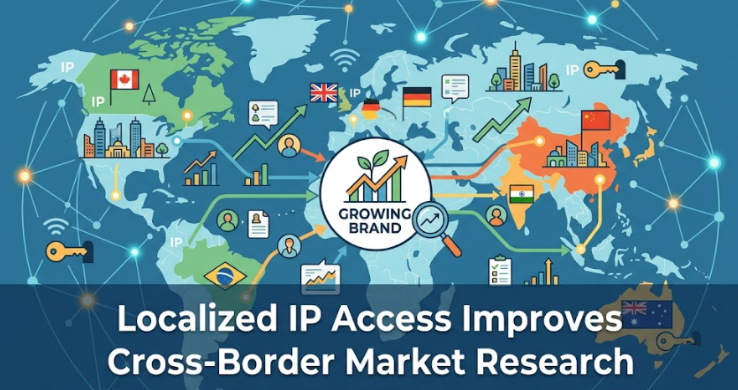
Cross-border expansion usually looks straightforward on paper. A brand picks a few promising markets, checks search demand, reviews competitors, studies marketplace pricing, and starts testing channels. In practice, the research often breaks down much earlier than teams expect. What a company sees from one location is not always what real users see in another. Search results change by country. Product availability shifts by city. Ad creatives, prices, reviews, and even landing pages can vary from region to region.
That is why localized IP access has become a practical research tool rather than a technical extra. When teams use region-specific connections, they can view markets in a way that is much closer to local customer reality. Providers such as Rola IP are part of that workflow because they give research, e-commerce, and growth teams access to residential IP coverage across a wide range of countries and regions, making it easier to validate what is actually live in-market.
For growing brands, this matters well before launch. Market research is not just about collecting more data. It is about collecting the right data from the right environment. If the source environment is wrong, the conclusions will be wrong too. A pricing team may think a competitor is discounting aggressively in Germany when the offer is actually meant for users in the UK. A paid media team may approve creatives based on what they see from headquarters, while local users are served something entirely different.
Why “local market visibility” is often missing
Many businesses still rely on a centralized research process. One team, often sitting in one office or one country, tries to evaluate multiple markets from a single network environment. That creates blind spots.
A few common examples:
- Google results differ by region and language.
- Marketplace rankings can shift based on local inventory and demand.
- Competitor pricing may change by country, city, or user segment.
- App or SaaS landing pages may display different offers based on geography.
- Ad verification becomes unreliable when the reviewer is not appearing as a local user.
This is where localized IP access changes the quality of research. Instead of making assumptions about how a market behaves, teams can inspect conditions closer to the way actual customers encounter them.
What localized IP access helps brands verify
Localized access is most useful when research needs to answer operational questions, not just broad market questions.
| Research area | What brands need to verify | Why localized IP access helps |
| Search visibility | Local rankings, SERP features, competitor presence | Search engines personalize by region and language |
| Pricing intelligence | Country-specific discounts, bundles, taxes, and shipping signals | Competitor pricing is often geo-dependent |
| Ad verification | Whether local users see the intended creative and placement | Ads can vary by market, device, and audience segment |
| Marketplace research | Product ranking, availability, seller competition | Listings and stock conditions differ across regions |
| Website localization | Currency, messaging, offers, and trust signals | Many sites adapt content based on user location |
| Expansion planning | Demand signals across target countries | Better local visibility reduces guesswork |
For a growth-stage company, this is not academic. These checks shape channel budgets, market-entry sequencing, pricing strategy, and even product positioning.
From broad research to decision-grade research
There is a big difference between “interesting research” and research a management team can use to make decisions. Decision-grade research has to be timely, repeatable, and geographically credible.
Say a DTC beauty brand is evaluating entry into Southeast Asia. It needs to know:
- Which competitors dominate organic search in Singapore versus Malaysia
- Whether top marketplace sellers are local or cross-border
- How prices compare after shipping and import signals
- Which promotional hooks are repeated in local paid ads
- Whether brands localize around ingredients, speed, prestige, or discounts
Without localized access, the team may still gather data, but it will be incomplete or distorted. With localized IP access, the brand can test each of those assumptions against what users in those markets are more likely to see.
That is one reason many operations teams now work with providers like Rola IP in the middle of their research stack. For brands that need practical market visibility, the value is not simply “having proxies.” The value is being able to run market checks across many countries, maintain stable access, rotate when needed, and support both manual validation and larger data collection workflows.
Where this becomes especially valuable
Localized IP access tends to deliver the strongest return in four business cases.
1. Competitive pricing and offer monitoring
Price is rarely static across borders. Competitors adjust for currency, demand, shipping expectations, promotions, and local purchasing power. A company entering a new market cannot assume a global price sheet reflects reality.
Localized access allows teams to review:
- Local list prices
- Promotional timing
- Discount depth
- Subscription bundles
- Shipping thresholds
- Region-specific coupons or first-order offers
This leads to cleaner pricing intelligence and fewer strategy mistakes.
2. Cross-border SEO and search research
For brands entering a new country, search behavior is one of the clearest signals of local demand and competition. But accurate SEO research depends on seeing local search results as locally as possible.
This helps teams evaluate:
- Which domains dominate category terms
- Whether aggregators or marketplaces control the SERP
- How local intent differs from translated keyword intent
- Which content formats win in a target region
- Whether branded competitors are over-investing in search
Rola IP’s website emphasizes residential IP coverage across 265+ countries and regions, which is useful in this context because SEO teams often need broad geographic reach rather than a single-country snapshot.
3. Ad verification for regional campaigns
When brands launch campaigns across multiple markets, they often trust screenshots from agencies, ad libraries, or internal teams. That is not always enough. Local ad delivery can differ by geography, timing, and audience conditions.
With localized access, teams can confirm whether:
- Campaigns are actually delivering in the intended region
- Creatives are localized correctly
- Offers match local landing pages
- Competitor ad pressure is increasing in a target market
For businesses spending seriously on paid acquisition, this reduces wasted budget and helps catch execution issues early.
4. Marketplace and channel expansion
Amazon, Walmart Marketplace, Lazada, Shopee, and regional marketplaces all create their own local dynamics. Availability, rankings, seller mix, and price positioning move constantly.
Localized market visibility helps brands answer hard questions faster:
- Is the category crowded with local sellers?
- Are imported products competitive after shipping?
- Which value proposition is winning?
- Are premium products rising, or is the market discount-driven?
Those answers are much more useful than generic “market potential” reports.
What to look for in a localized IP provider
Not every provider is a fit for business research. A brand doing serious cross-border work should focus on reliability and research usability, not just raw IP volume.
A useful checklist includes:
- Broad country and regional coverage
- Real residential IP options for more natural local access
- Stable uptime for repeated checks
- Geo-targeting at country or city level where needed
- Support for both rotating and sticky sessions
- Technical support when research workflows scale
Rola IP highlights several strengths that line up with these needs: 80M+ residential IPs, coverage across 265+ countries and regions, 99.9% uptime, and options spanning dynamic residential, static residential, datacenter, and scraping-oriented workflows. For teams moving from occasional market checks to recurring competitive intelligence, that flexibility matters.
The operational advantage most brands underestimate
The biggest gain is not just better visibility. It is faster alignment.
When pricing, SEO, paid media, and market-entry teams are all working from localized observations instead of assumptions, fewer internal debates are spent arguing over what is “really happening” in-market. Teams can compare like-for-like evidence, document findings by region, and move faster on launch decisions.
That is especially important for growing brands that do not have the luxury of learning through expensive trial and error in every country.
Cross-border market research becomes unreliable the moment a team assumes every market looks the same from one connection point. Local search results, pricing, ads, marketplaces, and on-site experiences all shift by geography. If a brand wants accurate expansion intelligence, it needs to see each market more like local users do.
Localized IP access helps close that gap. Used well, it supports more credible search research, cleaner pricing analysis, stronger ad verification, and smarter market-entry planning. For brands building an international growth playbook, that makes it a business tool, not just a technical one.
FAQs
What is localized IP access in market research?
Localized IP access means connecting through IPs tied to specific countries or regions so researchers can view websites, search results, ads, and marketplaces in a way that better reflects local user conditions.
Why is localized IP access important for cross-border brands?
Because pricing, search visibility, ad delivery, and content localization often differ by market. Without local visibility, brands may make decisions based on incomplete or misleading data.
No. Mid-sized e-commerce brands, SaaS companies, agencies, and marketplace sellers all benefit when they need more accurate regional insights before committing budget to expansion.
How does Rola IP fit into this workflow?
Rola IP provides residential and other proxy options designed for use cases such as market research, SEO monitoring, ad verification, and large-scale data collection. Its broad geographic coverage and session options make it suitable for teams that need repeated cross-border checks.
What should brands measure after adopting localized research workflows?
They should track research accuracy, speed of market validation, pricing response time, campaign QA quality, and the percentage of launch decisions backed by region-specific evidence rather than generalized assumptions.
-

 BLOG11 months ago
hanime1: The Ultimate Destination for Anime Lovers
-

 ENTERTAINMENT1 year ago
Sflix: How It’s Changing the Way We Watch Movies and TV Shows
-

 BILLS1 year ago
Why Does My Instagram Reel Stop Getting Views After One Hour? How to Fix It?
-

 ENTERTAINMENT1 year ago
Crackstreams 2.0: The Future of Free Sports Streaming?
-

 BLOG12 months ago
Imginn: The Ultimate Tool to View Instagram Content Anonymously
-

 BLOG11 months ago
ThisVid: What Makes It Stand Out in the World of Online Videos
-

 BLOG1 year ago
NHentai.nef: Understanding the Popular Hentai Archive
-

 Technology1 year ago
Simpcitt: The Rise of a Unique Online Community