
BLOG
Hard Drive Not Detected? Steps to Fix and Recover Your Data

You plug in your hard drive as you normally do, but nothing happens. No icon, no notification, just silence where your files ought to be. It could be an external drive that was fine yesterday, or an internal one that vanished after a random reboot.
The first thing you’re probably thinking is the worst possible thing: is all of that gone for good? No, generally, usually, the drive is still there with your files intact, and something much smaller has gone wrong between it and your computer. This article covers what’s probably happening, why, the exact steps to get your HDD not recognized, and how to safely pull your data off if it doesn’t.
Part 1: What It Means When Your HDD Is Not Recognized
Usually, if your computer doesn’t see a hard drive, it shows up in one of a few ways.
Common Signs of an Unrecognized Drive:
- Windows will not recognize the drive and will show an error message.
- The drive shows up as “Unknown” or “Not Initialized” in Disk Management.
- File Explorer doesn’t show the drive.
- On Mac, the drive doesn’t mount, and Finder shows nothing where the icon should be.
It therefore doesn’t mean your data is entirely lost. Usually, it is not the drive itself that is the problem, but the connection between the drive and your operating system has broken down somewhere. That failure could be electrical, mechanical, or software on its own. The first step to a safe and effective fix is to know which category your problem falls into.
What Common Error Messages Actually Mean
Windows and macOS tend to show a specific error text that gives you a hint about what’s happening wrong, rather than just a generic failure.
- “USB Device Not Recognized” is usually a driver conflict or a USB port that’s going bad.
- “You have to format the disk before you can use it” means the disk has a corrupted file system, not necessarily lost data.
- “Disk Unknown, Not Initialized” in Disk Management usually indicates a damaged partition table.
- “The disk is write-protected” can be a hardware switch, a corrupted sector, or a permissions conflict.
Reading the exact wording of your error carefully can save time by narrowing down which fix to try first.
Part 2: Why HDDs Become Unreadable or Invisible
There are several reasons a drive may disappear, which usually fall into two categories: physical damage and logical errors.
Physical Damage Causes
- Damaged enclosure or worn-out connectors.
- Cause internal read/write head failure.
- A dying or seized motor.
- Warning signs could be clicking, grinding, or repetitive spinning sounds.
Logical Error Causes
- Damaged partition tables or corrupted file systems.
- Outdated or incompatible device drivers.
- Incorrect drive letter assignments in Windows
- File transfers that can break internal structures if power is interrupted.
- Malware infections or incorrect removal of external disks.
- A bad port or a loose USB cable on a perfectly good drive.
Identifying whether your issue is physical or logical will determine which fix to try first.

Part 3: When You Should Take Action Immediately
Not all unknown driving situations are emergencies, but some are.
Stop Immediately If You Notice:
- Weird noises from the drive, like clicking, buzzing, or grinding.
- The drive has been dropped recently, exposed to liquid, or experienced a power surge.
- The drive keeps cycling up and down and does not mount.
If you continue using a drive that is physically failing, you could lose data permanently in minutes. If this is the case, your best option is to use a professional data recovery service, as attempting to access the drive yourself could make things worse.
It’s Safer to Troubleshoot Yourself if:
- There are no strange sounds or physical warning signs.
- The drive was working fine until recently; it just disappeared.
If you’re in this second case, you likely have time to try software-based fixes first. Just be sure not to write any new data to the drive while troubleshooting, as this can overwrite recoverable files.
Part 4: How to Fix and Recover Data from an Unrecognized HDD
Before you begin any fixes, do not save any new data to the affected drive—the risks of overwriting files that could otherwise be recovered. If the drive is physically damaged, with unusual noises or no spinning at all, go directly to professional recovery help. For all other cases, the logical issues that cause most detection problems, the following steps should help you fix hard drive not showing in Windows and get your files back safely.
Fix 1: Check Basic Hardware Connections
The simplest explanation first: A surprisingly large number of detection failures are caused by loose or damaged connections.
- If you’re using an external HDD, unplug it and try a different USB port on your computer.
- Ports can wear out over time, especially if they are used frequently for charging or file transfer.
- Try another USB cable as well; damaged cables often look OK but do not transmit data correctly.
- If it’s an internal drive, shut down your computer completely and ensure the SATA and power cables are securely connected.
- Try the drive on another computer, if possible, to rule out issues with your original system.
This one step will fix a large percentage of external HDD not detected recovery cases without the need for any software at all.
Fix 2: Check Disk Management and Assign a Drive Letter
If the hardware checks out OK, then the next step is to look inside Windows itself.
- Right-click on the Start menu and select Disk Management to open the built-in disk utility.
- Even if you don’t see your drive in File Explorer, you can still find it in the list.
- Sometimes Windows can see a drive but doesn’t assign it a drive letter, so you can’t see it anywhere else.
- If you see the drive listed but it does not have a letter, right-click it and select “Change Drive Letter and Paths.”
- Assign a new, unused letter, then verify that the drive is accessible.
- If the drive shows up as “Unallocated” or “RAW”, don’t format it yet, as this will erase the existing data.
No. Instead, run recovery software before you change the drive’s structure.
Fix 3: Update or Reinstall the Disk Driver
Very often, the cause of a healthy drive disappearing from Windows with no hardware fault at all is outdated or corrupted drivers.
- To do this, right-click the Start menu and select Device Manager from the list.
- Expand the “Disk drives” section and locate your drive, which may be displayed with a yellow warning icon.
- Right-click the drive, click Update driver, and then click Search automatically for drivers.
- If Windows can’t find an update, try removing the driver altogether.
- Right-click the drive and select “Uninstall device.” Restart your PC, and Windows will reinstall it automatically.
This process usually fixes detection issues caused by driver corruption or a recent Windows update conflict. If the drive still isn’t showing up after that, move to dedicated recovery software.
Fix 4: Use Professional Recovery Software for Logical Failures
If a drive appears as RAW, unallocated, or won’t open even though it’s detected, you need dedicated recovery software. Manually attempting repairs at this stage risks permanent data loss if something goes wrong.
- This type of unrecognized HDD issue is exactly what 4DDiG Hard Drive Data Recovery is designed to handle, helping you recover data from unrecognized HDDs.
- It scans drives that Windows can’t normally read.
- It does this by working with the drive’s raw sectors, completely ignoring the damaged file system.
- In this way, it can find and recover files even if the drive’s structure has been damaged or lost.
Below is a step-by-step guide to using it safely.
4DDiG Step-by-Step Guide
- Download and install 4DDiG Data Recovery on a working computer, not on the damaged drive.
- Use a good cable and port to connect your Unrecognized HDD to the computer.
- Launch 4DDiG and choose the problematic drive from the detected disks.
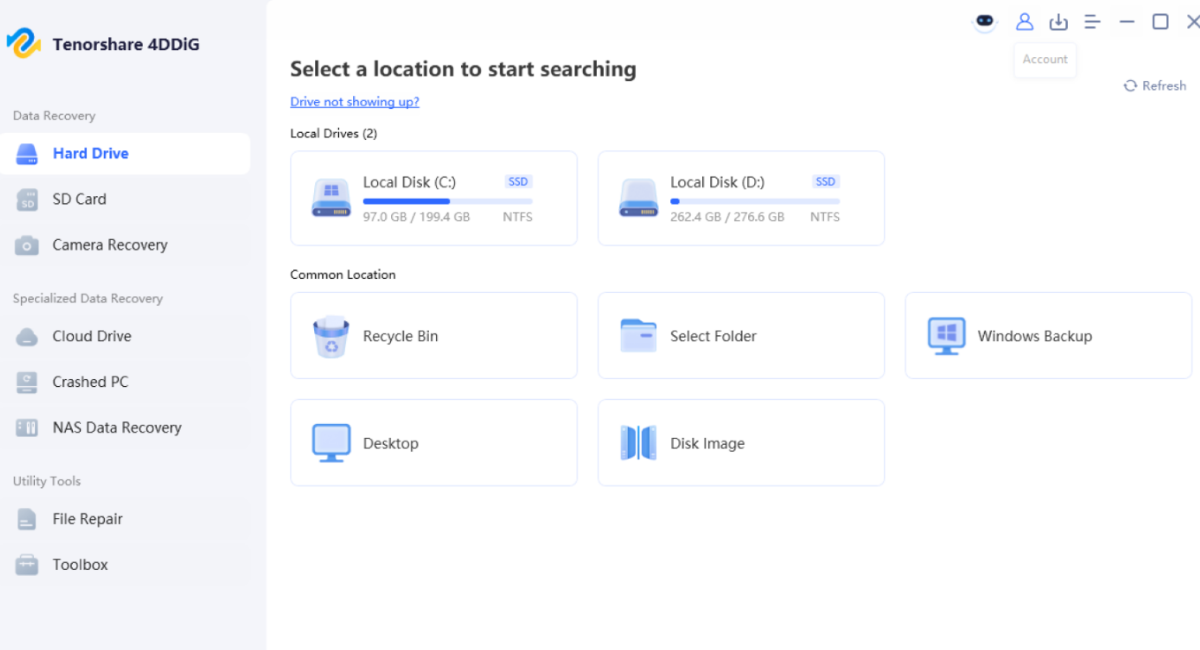
- Click “Scan” to start analyzing the drive for recoverable files and folders.
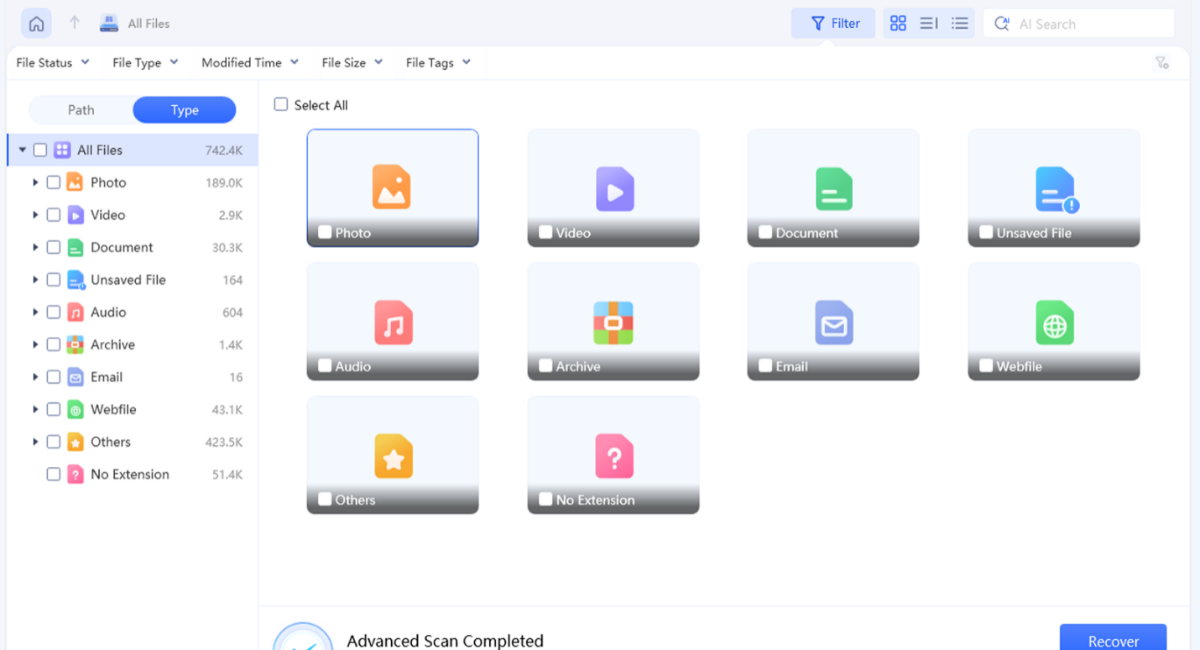
- When it’s done, preview the results and make sure your important files are safe.

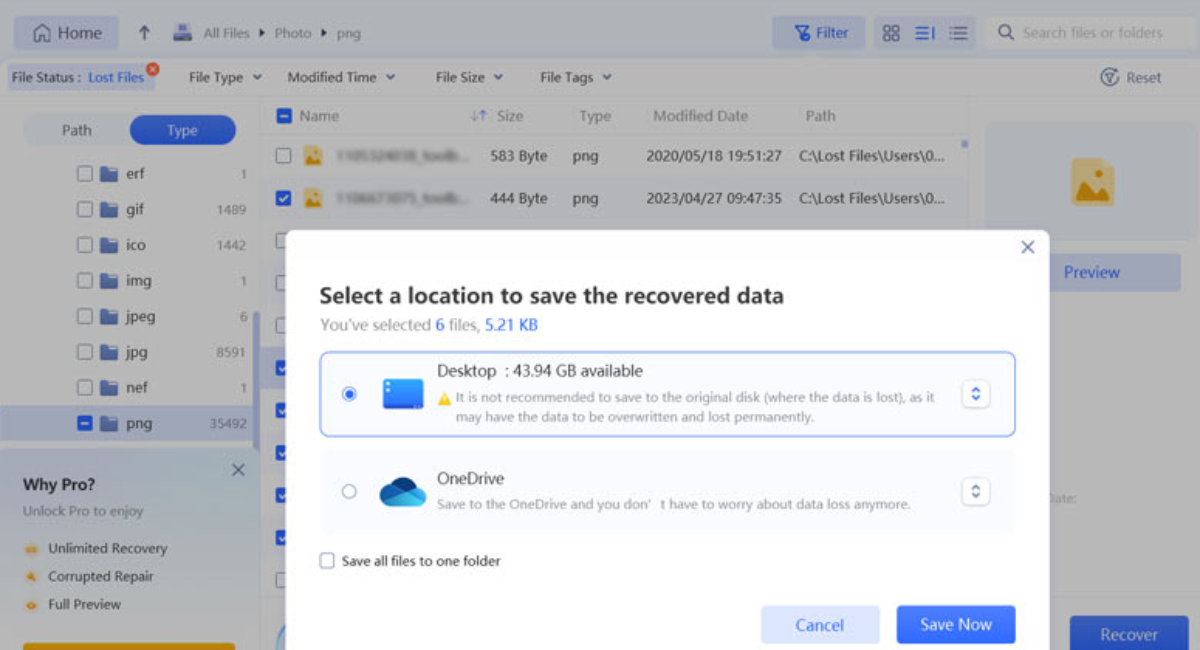
- Select the files you need and save them to another good drive.
Fix 4: Run a Deep Scan and Recover Data Safely
Sometimes the quick scan comes back, and your file isn’t there. That doesn’t mean it’s gone; it usually means the quick scan didn’t go deep enough. The deep scan scans the entire drive sector by sector, rather than trusting. Whatever is left of the file system, which is exactly why it works on drives that have been formatted or badly corrupted. The trade-off is time. A large drive can take hours to complete, so start it and walk away instead of watching the progress bar.
4DDiG Step-by-Step Guide:
- Scan fast and pick either ‘Deep Scan’ or ‘All-Around Recovery’ mode.

- Allow the scan to complete without disconnecting the drive or stopping the program early.

- Narrow results down to documents, photos, or videos using the file type filters.
- Preview recovered items carefully before choosing which to restore.

- Never restore recovered files to the original drive; always restore to a different drive.
Once you have safely retrieved your files, you can then decide what to do with the unrecognized drive (repair/reformat/replace).
Part 5: How to Prevent HDD Recognition Issues in the Future
One who has been through recovery once usually does not care to go through it again.
- Always eject external drives in your OS before unplugging the cable. One of the quickest ways to corrupt a drive is to pull it out mid-transfer.
- Update the storage drivers. Older ones create more disappearing-drive tickets than people think.
- Don’t go cheap on the USB cable or enclosure. A flaky cable will give you the same headache again.
- Then, follow the 3-2-1 backup rule: Have three copies of your data, on two different types of media, one of them offsite or in the cloud.
- Run CHKDSK now and then. It catches little file system errors before they turn into a drive that won’t mount at all.
- Protect external drives from heat, moisture, and falls. HDDs have moving parts, and moving parts do not forgive rough treatment.
- If a drive is more than five years old, don’t wait for it to fail. Change it while you can in your own time.
Final Words:
It is a bit like the end of the world for about five minutes when a drive disappears from your computer, until you realize that most of the time it is not. Before you think something is broken forever, try the easy things first: a different cable, a different port, a look inside Disk Management. If that fails, employ recovery software to do the heavy lifting instead of trying to guess your way through repairs on a drive with files you really care about.
That’s exactly what 4DDiG Data Recovery is designed to do: recover files from drives that Windows has already given up on. The clicking and grinding noises are really the only things that should give you pause and prompt you to call in a professional instead of attempting this on your own. Usually, a little patience can fix everything else.
Frequently Asked Questions
i. Is it possible to recover a drive that is not showing up?
Yeah, mostly. A missing drive letter, corrupt file system, or driver conflict does not delete your files. Usually, the data remains on the disk itself until something overwrites it.
ii. Is it safe to run CHKDSK on a drive that is not recognized?
Only if you are sure the problem is logical, not physical. If the drive is failing, running CHKDSK can make things worse. Scan the drive for recoverable files first.
iii. Why does my external HDD work on one computer but not the other?
That is usually indicative of a driver, port, or USB controller issue on the computer that does not see it, not the drive itself.

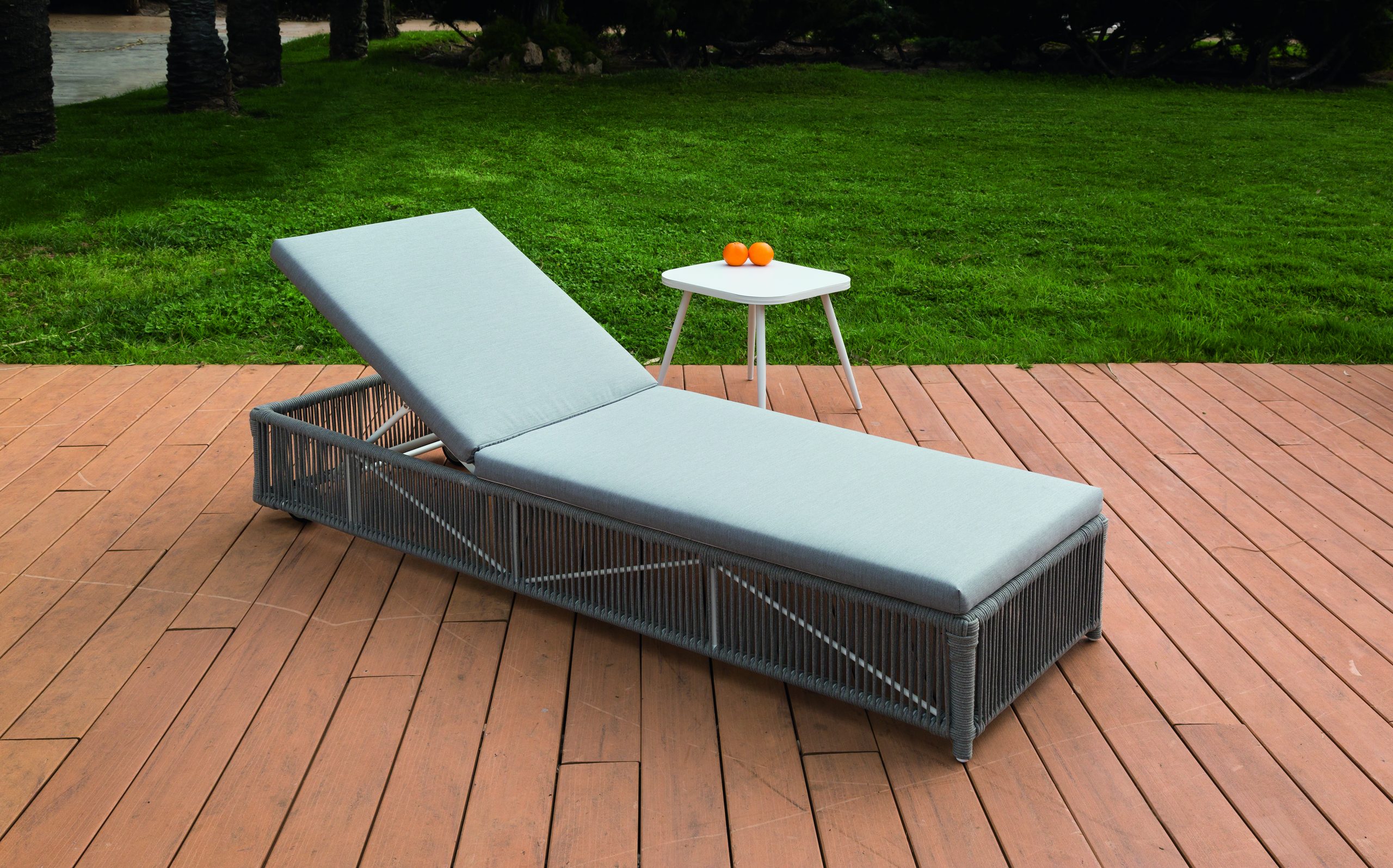
Modern life rarely gives us permission to slow down. Between work, notifications, errands, and endless responsibilities, genuine rest can feel surprisingly difficult. That is where tumbons enter the picture. Associated with reclining outdoor loungers and relaxed seating, they represent more than a comfortable place to sit. They encourage people to pause, breathe, and enjoy a quieter moment.
The appeal is simple. Sometimes, the best way to recharge is not another activity but doing less. A comfortable reclining seat can turn a balcony, garden, patio, or sunny corner into a personal retreat.
What Are Tumbons?
Tumbons generally refers to reclining lounge chairs designed to provide a more relaxed sitting position. Their extended shape supports several parts of the body, while adjustable backrests can allow users to change their posture.
The exact spelling and meaning can vary online. Some sources connect the term with Spanish-influenced words for loungers, while others use it as a broader name for portable reclining furniture.
Regardless of terminology, the underlying idea remains consistent: comfortable seating designed for slowing down.
Unlike a conventional upright chair, a recliner-style lounger allows the body to stretch out. This makes it especially suitable for reading, sunbathing, relaxing, or simply enjoying the outdoors.
Tumbons and the Art of Reclining
There is something naturally satisfying about reclining. After spending hours sitting upright at a desk or moving between tasks, changing posture can feel like a small reset.
Tumbons support this transition from activity to relaxation. Instead of encouraging you to stay productive, they create an environment where doing nothing becomes acceptable.
That matters in a culture where busyness is often treated as a measure of success.
Reclining can also change how people experience their surroundings. A garden becomes more enjoyable when you can watch the trees without standing. A balcony feels more inviting when it becomes a place for morning coffee. Even a small patio can become a relaxing escape.
Why Tumbons Feel So Comfortable
The main attraction is ergonomic flexibility. A good outdoor lounger supports the back while giving the legs room to extend.
Many reclining designs include adjustable back sections. This allows users to choose a position based on the activity they are doing.
For example:
- A relatively upright angle works well for reading.
- A moderate recline can suit conversation.
- A deeper position is ideal for relaxing.
- A nearly flat setting can work for quiet outdoor rest.
This flexibility is one reason reclining furniture continues to appear in gardens, pool areas, patios, hotels, and beaches.
Tumbons Turn Outdoor Spaces Into Retreats
Outdoor furniture does not have to be complicated. A single comfortable lounger can completely change how a space feels.
Imagine a quiet garden with one reclining chair beneath a tree. Add a small table, a book, and a cool drink. Suddenly, the area becomes more than an unused section of the yard.
Tumbons can help create that feeling because they are associated with leisure rather than formal entertaining.
They can also work in smaller spaces. A balcony or compact terrace may not accommodate a large outdoor sofa, but a streamlined lounger can provide a personal relaxation zone.
Tumbons and the Psychology of Taking a Break
Rest is often treated as something that happens only after everything else is finished. Unfortunately, there is almost always another task waiting.
A dedicated relaxation space can make taking a break feel more intentional.
When someone settles into a reclining chair, the physical environment sends a simple message: this is time to slow down.
That mental shift can be valuable. Reading a few pages, listening to music, watching clouds, or enjoying fresh air may seem insignificant. Yet small moments of uninterrupted rest can make everyday life feel less overwhelming.
The goal is not to spend the entire day doing nothing. It is to create room for recovery.
Choosing the Right Tumbons for Your Space
Not every lounger will suit every outdoor area. Before buying one, consider how and where you plan to use it.
1. Check the Frame
A strong frame is important for outdoor furniture. Aluminum, treated wood, and other weather-resistant materials are commonly used in lounge designs.
Look for sturdy construction and stable joints. A chair should feel secure when you change positions.
2. Consider Portability
If you plan to move the chair between the garden, patio, and storage area, weight matters.
Foldable designs can be particularly practical because they are easier to store when not in use.
3. Look at Adjustability
An adjustable backrest provides more flexibility than a fixed position. Think about whether you will mainly read, nap, sunbathe, or socialize.
Your preferred activity should influence the design you choose.
4. Think About Maintenance
Outdoor furniture faces sunlight, moisture, dust, and changing temperatures. Easy-to-clean fabrics and weather-resistant materials can reduce maintenance requirements.
A little regular care can also help extend the useful life of the chair.
Tumbons for Different Lifestyles
One reason reclining loungers remain popular is their versatility.
For readers, they create a comfortable outdoor reading corner. For families, they can provide additional seating around a pool or garden. For travelers, lightweight versions may be useful for beaches and camping.
They can also complement minimalist outdoor design. Rather than filling a patio with unnecessary furniture, one well-designed lounge chair can provide both function and visual simplicity.
This approach fits naturally with the growing interest in intentional living. The objective is not to own more things but to make everyday spaces more useful.
Why Reclining Can Be Good for the Soul
The phrase “good for the soul” does not need to be interpreted literally. It captures something many people recognize: rest can improve how we feel about daily life.
Reclining creates a physical pause. That pause can encourage mental quiet as well.
There is value in watching a sunset without checking a phone. There is value in reading without rushing. There is value in sitting outside simply because the weather is pleasant.
Tumbons symbolize this slower approach to leisure. They remind us that comfort does not always need to be earned through exhaustion.
Sometimes, stopping is productive in its own way.
Tumbons and the Future of Outdoor Relaxation
Outdoor spaces are increasingly being treated as extensions of the home. Patios, balconies, gardens, and decks can serve as places for work, meals, entertainment, and relaxation.
That shift creates demand for furniture that combines comfort with practicality.
Reclining loungers fit naturally into this trend. They require relatively little space while providing a dedicated place to unwind.
Future designs will likely continue focusing on lightweight materials, adjustable positioning, easier storage, and improved weather resistance.
Final Thoughts on Tumbons
Tumbons represent a simple idea that can easily get lost in modern life: sometimes, we need to stop.
A reclining c
hair cannot solve every problem. However, it can create a small space where the mind and body are encouraged to slow down.
Whether placed beside a pool, beneath a garden tree, on a balcony, or across a sunny patio, a comfortable lounger can make ordinary moments feel more meaningful.
In a world that constantly asks us to move faster, reclining offers another option.
Sit back. Take a breath. Look around.

Veneajelu is more than simply taking a boat across the water. In Finland, it represents a peaceful way to experience lakes, forests, islands, and long summer evenings. The country’s waterways create an ideal setting for slow travel and outdoor relaxation.
For many visitors, a boat ride offers a different perspective on Finnish nature. From the water, quiet shorelines and forest-covered islands feel more immersive. The gentle movement of a boat can also turn an ordinary afternoon into a memorable experience.
Whether you prefer a traditional rowing boat, a small motorboat, or a guided cruise, veneajelu can suit different travel styles. The key is knowing where to go, what to bring, and how to enjoy the experience responsibly.
What Does Veneajelu Mean?
The Finnish word veneajelu generally refers to going for a boat ride or taking a recreational trip by boat. It combines the idea of a boat with traveling or riding for enjoyment.
The activity can be simple or carefully planned. Someone might spend an hour rowing across a nearby lake, while another traveler could organize a full-day island adventure.
This flexibility makes it accessible to many people. You do not need to be an experienced sailor to appreciate the calm atmosphere of Finland’s waterways.
Veneajelu and Finnish Outdoor Culture
Finland has thousands of lakes, rivers, and coastal waterways. Water has therefore played an important role in Finnish life for generations.
Boating is connected with summer cottages, fishing trips, family holidays, and nature exploration. During warmer months, locals often head toward the water to escape busy routines.
A relaxed veneajelu fits naturally into this lifestyle. It focuses less on speed and more on enjoying the surroundings.
Why Veneajelu Is Popular in Finland
One reason veneajelu attracts visitors is the country’s remarkable natural environment. Finnish lakes often feature clear water, rocky shores, dense forests, and small islands.
The experience can also be surprisingly peaceful. Away from busy tourist centers, you may hear little more than birds, wind, and water moving against the boat.
A Simple Way to Experience Nature
Walking through a forest provides one perspective on Finnish landscapes. Seeing the same environment from a boat creates another.
You can observe shorelines from the water and discover small islands that may be difficult to reach on foot. The changing reflections across the lake can make familiar scenery look completely different.
For photographers and nature lovers, this can be especially rewarding.
A Break From Digital Life
Modern travel often involves constant navigation, notifications, and schedules. A boat ride encourages travelers to slow down.
There may be no need to check your phone every few minutes. Instead, you can watch the clouds, listen to the water, and enjoy conversation with your companions.
That slower rhythm is one of the most appealing parts of veneajelu.
Best Places for Veneajelu
Finland offers countless destinations for recreational boating. The best choice depends on whether you want quiet nature, island exploration, cultural attractions, or easy access from a city.
Lake Saimaa
Lake Saimaa is one of Finland’s most famous lake destinations. Its extensive waterways, islands, and beautiful landscapes make it an excellent choice for boating.
Travelers can explore peaceful coves, scenic shorelines, and small communities around the lake.
Lake Päijänne
Lake Päijänne offers another excellent environment for a relaxing boat journey. Its long stretches of water and varied landscapes provide plenty of opportunities for exploration.
The lake is particularly attractive to travelers who want a mixture of open water and natural scenery.
Finnish Archipelago
Finland’s coastal archipelago creates a different kind of boating experience. Instead of large inland lakes, visitors encounter islands, narrow channels, rocky landscapes, and sea views.
A guided trip can be useful here, especially for travelers unfamiliar with local waterways.
Choosing the Right Boat
Your choice of boat can significantly influence the experience. Fortunately, there are options for different comfort levels and budgets.
Rowing Boats
A rowing boat provides one of the most traditional ways to explore a Finnish lake. It is quiet, simple, and environmentally friendly.
Because you control the pace, rowing can also encourage a slower and more relaxing journey.
Motorboats
Motorboats are useful when you want to cover greater distances. They allow travelers to visit multiple locations within a single outing.
However, operating one requires greater awareness of navigation, weather conditions, and local boating rules.
Guided Boat Tours
First-time visitors may prefer an organized tour. A local guide can explain the landscape while handling navigation and practical details.
This option allows travelers to focus entirely on the scenery and experience.
Planning a Safe Veneajelu
Enjoyment should always come with responsible preparation. Finnish weather can change quickly, particularly on larger lakes and coastal waters.
Before leaving, check the forecast and understand the planned route.
Essential Safety Tips
Keep these basics in mind:
- Wear an appropriate life jacket.
- Check weather conditions before departure.
- Tell someone about your route when traveling independently.
- Carry a charged phone in a waterproof case.
- Bring drinking water and basic supplies.
- Avoid unnecessary speed in unfamiliar waters.
- Follow local boating regulations.
- Never underestimate cold water.
Even experienced boaters should remain cautious. Calm conditions can change faster than expected.
What to Bring on Your Veneajelu
Packing for a boat ride does not have to be complicated. A few practical items can make the trip more comfortable.
Consider bringing:
- Light waterproof clothing
- Sunscreen and sunglasses
- A warm extra layer
- Water and snacks
- A small first-aid kit
- A phone or camera
- Waterproof storage bags
- Navigation equipment when needed
The Finnish summer can be mild, but temperatures may feel cooler on open water. Dressing in layers is therefore a smart choice.
The Best Time for Veneajelu
Summer is generally the most popular season for recreational boating in Finland. Long daylight hours create excellent opportunities for extended trips.
June, July, and August can provide particularly pleasant conditions, although weather varies by region.
Late Evening Boat Trips
One of the most memorable options is an evening journey. Finnish summer evenings can remain surprisingly bright, especially around the northern parts of the country.
A quiet ride during the evening can offer beautiful reflections and a peaceful atmosphere.
For many travelers, this becomes the highlight of their Finnish holiday.
Making Veneajelu More Memorable
A successful boat ride does not require an elaborate itinerary. In fact, leaving some time unplanned can make the experience better.
Choose a scenic route, bring something to eat, and allow yourself time to stop near an island or quiet shoreline.
You can combine boating with swimming, photography, fishing, or a picnic. Families can turn the outing into an easy outdoor adventure, while couples may prefer a quieter sunset journey.
The most important element is the opportunity to enjoy Finland at a slower pace.
Environmental Responsibility
Finland’s waterways are valuable natural habitats. Responsible boating helps preserve them for future generations.
Avoid leaving rubbish behind and use designated facilities whenever available. Keep a respectful distance from wildlife and avoid disturbing nesting birds.
Boat operators should also follow local restrictions concerning protected areas and speed limits.
Small decisions can make a significant difference. Sustainable veneajelu allows travelers to enjoy nature without unnecessarily damaging it.
Final Thoughts on Veneajelu
Veneajelu captures a simple but meaningful part of Finnish outdoor culture. It combines peaceful travel, natural beauty, and the freedom to explore waterways at your own pace.
From Lake Saimaa and Lake Päijänne to the coastal archipelago, Finland offers remarkable settings for a boat adventure. You can choose a traditional rowing boat, a motorboat, or a guided excursion depending on your preferences.
With sensible preparation, appropriate safety equipment, and respect for the environment, a boat ride can become one of the most rewarding ways to experience Finland.
Ultimately, veneajelu is not about reaching a destination quickly. It is about enjoying the journey, appreciating quiet landscapes, and allowing the water to set the pace.
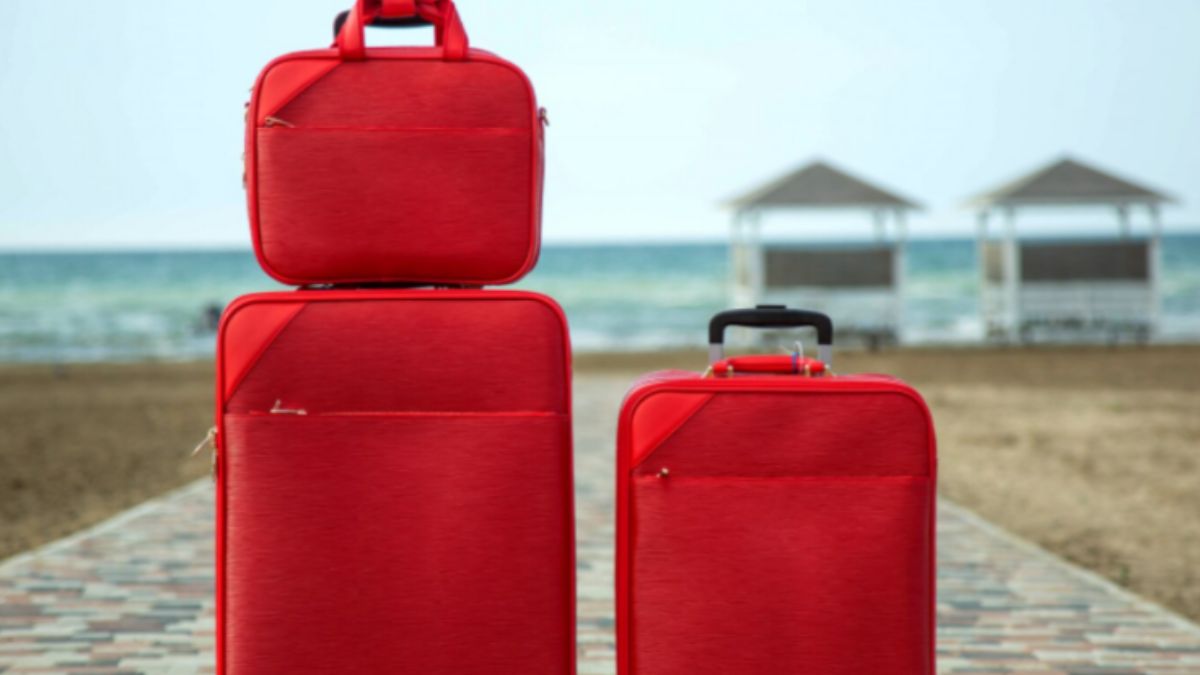
Finding a luggage set is not only about getting several suitcases in one purchase. The pieces need to match your travel needs, suit your packing habits, and handle the demands of regular trips.
Two sets can contain a similar number of pieces but still differ in their dimensions, interior layout, materials, and construction. These differences can affect how each set performs during packing, transport, and storage.
Size and durability therefore become important points when comparing luggage sets. Looking at both can help you understand differences that are easy to miss when you focus only on piece count or appearance.
So, how do the best luggage sets compare in size and durability?
Keep reading to explore the key differences.
Size Comparison

Physical dimensions and capacity may show significant variations when comparing the best luggage sets. The following sections examine the influences of the case size, interior design, and set composition on the comparison.
1. Small, Medium, and Large Case Sizes
Different sizes of cases can be part of a luggage set, such as smaller carry-on luggage, medium and large suitcases. Smaller cases provide less packing space, while larger cases offer more room for longer trips and heavier packing. A collection, with a more dispersed variety of sizes, may thus offer a greater variety of capacity than one containing cases of the same size.
Handling and storage are also dependent on case size. Smaller cases are usually easier to transport and store, whereas large cases occupy more space and may be difficult to lift or carry. These differences can be addressed by the best luggage sets combining sizes of cases that can be used to fulfill different travel purposes.
The perfectly designed luggage sets also consider the entire size of each case, including the outer components of the luggage such as wheels and handles. Those components may contribute to the total size and influence the amount of space a case takes up during transportation and storage.
Carry-ons must also be of a size that complies with airline restrictions. A practical luggage set can thus integrate small items with larger cases and have each size serve a different purpose.
2. Packing Space Across Different Sizes
The best luggage sets provide a useful range of packing capacity across their different case sizes. Smaller cases have less room for clothing and other belongings, while medium and large cases offer progressively more space for longer trips and heavier packing.
Usable capacity can also vary even when two cases have similar outside dimensions. The shape of the case, wheel housings, handles, pockets, and other built-in features can reduce the space available inside. Well-designed luggage makes practical use of the space within its outer dimensions.
Interior design further affects how the available space is arranged. Features such as expandable sections can add capacity when included, while an organized interior can make room for clothing and other belongings easier to use. These design differences can give one luggage set more practical packing space than another.
A strong luggage set therefore combines different case sizes with useful interior capacity. Smaller pieces provide compact storage, while larger cases offer more room without relying on piece count alone to create value.
3. Two-, Three-, and Four-Piece Set Sizes
The number of pieces changes the range of sizes within a luggage set. A two-piece set may combine a smaller case with a larger suitcase, while three-piece and four-piece sets can include additional sizes.
Well-rounded sets can use different case sizes to cover a wider range of travel needs. Smaller collections may focus on a few core sizes, while larger sets can provide more variation in capacity and packing options.
Weight also affects the practical capacity of larger cases. More spacious suitcases can hold more belongings, but the empty case adds weight before anything is packed. A larger-capacity case can therefore provide more room while leaving less of an airline baggage allowance for packed items.
Durability Comparison
Durability depends on the main case construction and the components that receive repeated use. Materials, wheels, handles, zippers, and seams can all contribute to how well a luggage set holds up during regular travel.
1. Hard-Sided and Soft-Sided Durability
Hard-sided and soft-sided luggage use different forms of construction. A hard-sided case has a rigid outer structure that can provide a firm barrier around belongings. Soft-sided luggage uses flexible fabric construction, allowing the exterior to give more easily when packed or handled.
Material choice creates further differences within each construction type. Hard-sided luggage can use materials such as polycarbonate or ABS, while soft-sided cases commonly use durable fabrics. These materials can differ in weight, flexibility, resistance to impact, and ability to maintain their shape during regular use.
Rigid cases can provide a firmer outer structure, while flexible cases can accommodate movement and changes in packing volume. An expandable design can add further flexibility to a soft-sided case when that feature is included.
The best luggage sets can combine suitable materials with solid overall construction. Durability is not determined by the outer material alone, since the quality of the case structure and its individual components also affects how well the luggage handles repeated use.
2. Wheel and Handle Durability
Wheels face repeated contact with floors, pavement, curbs, and other surfaces during travel. Handles also experience regular stress as you pull, extend, lift, and guide a suitcase.
Two-wheel and four-wheel designs use different rolling arrangements. Four-wheel spinner luggage can move in multiple directions, while two-wheel designs typically pull from behind. Secure mounting and solid construction can help rolling components withstand repeated use.
Handle durability also depends on its construction and connection to the case. A stable telescoping handle with little wobble and a secure mounting point can support repeated pulling, lifting, and guiding.
3. Zippers, Seams, and Overall Construction
Zippers form an important part of luggage construction because they must open and close repeatedly while keeping the case securely shut. A well-constructed zipper can support regular use without placing unnecessary stress on the surrounding material.
Seams also contribute to the overall construction of soft-sided luggage. These areas join different sections of the case and experience stress during packing, lifting, pulling, and handling. Strong stitching can help the case maintain its structure through repeated use.
Overall construction brings these elements together. Durable luggage can combine secure closures, strong stitching, and well-connected sections rather than relying on the outer material alone. The quality of these smaller construction details can therefore contribute to how well a luggage set holds up over time.
Bottom Line
The best luggage sets can combine a useful range of case sizes with durable construction. Smaller cases provide more compact packing options, while medium and large cases offer greater capacity for longer trips.
Durability comes from more than the outer case material. Wheels, handles, zippers, seams, and connection points also contribute to how well each case handles repeated travel.
A strong luggage set therefore brings together useful size variation, practical packing space, and solid construction across its individual cases.
-

 BLOG1 year ago
hanime1: The Ultimate Destination for Anime Lovers
-

 Technology1 year ago
GLAADVoice.com: How You Can Get Involved and Make a Difference
-

 BILLS1 year ago
Why Does My Instagram Reel Stop Getting Views After One Hour? How to Fix It?
-

 ENTERTAINMENT1 year ago
Sflix: How It’s Changing the Way We Watch Movies and TV Shows
-

 BLOG1 year ago
NHentai.nef: Understanding the Popular Hentai Archive
-

 BLOG1 year ago
Imginn: The Ultimate Tool to View Instagram Content Anonymously
-

 ENTERTAINMENT1 year ago
Crackstreams 2.0: The Future of Free Sports Streaming?
-

 BLOG1 year ago
ThisVid: What Makes It Stand Out in the World of Online Videos