
BLOG
Septic Tank Pumping in Portland, Oregon: A Simple Homeowner Schedule and Care Plan


For Portland, Oregon, homeowners with onsite wastewater systems, septic maintenance is a practical part of protecting the home, yard, and local environment. Portland’s wet winters, lush landscaping, and varied soil conditions make it especially important to keep wastewater moving where it belongs. Planning septic tank pumping Portland service before trouble starts can help reduce the risk of inconvenient backups and expensive drain field damage.
A septic tank is easy to overlook because most of its work happens underground. However, the tank collects solids every day, and those solids do not disappear on their own. A written maintenance plan gives Portland-area homeowners a clearer way to manage pumping, watch for warning signs, and make sound decisions when seasonal rain or busy household routines place added demand on the system.
Why Septic Tank Pumping Matters
Wastewater from toilets, sinks, showers, and appliances carries solids into the septic tank. Heavier material settles into a sludge layer at the bottom, while oils, grease, and lighter debris form a scum layer at the top. The liquid layer in the middle is intended to move onward to the drain field. When sludge and scum take up too much space, solids can move toward the outlet and strain components that should remain clear.
Routine pumping is preventive care, not simply an emergency response. Removing accumulated material can help lower the chance of indoor backups, sewage odors, and drain field problems. That matters in Portland’s rainy months, when already-saturated ground may make drainage concerns more noticeable around the property.
How a Septic System Works
A septic system begins when household wastewater leaves the home through the main plumbing line and enters the tank. Inside, solids separate from liquids. Baffles and, on many systems, an effluent filter help keep floating and settled material from entering the outlet. The remaining liquid effluent then moves into the drain field, where soil provides additional treatment.
The drain field needs balanced water flow and healthy, uncompacted soil to do its job. Heavy rain, poor drainage, excess water use, or vehicle traffic can all create added stress. For a visual explanation of tanks, baffles, filters, and drain fields, see this homeowner’s guide to septic tanks.
When to Pump a Septic Tank
Many households use a three-to-five-year planning range, but no calendar rule fits every Portland home. A smaller tank serving a larger family may need attention sooner, while a larger tank with light use may have a different schedule. The best starting point is the last pumping record, followed by the tank size, household size, water use, and any service notes from prior visits.
Suggested Planning Checklist
- Find the date and findings from the last pumping visit.
- Confirm the tank capacity, if records are available.
- Count permanent residents and frequent overnight guests.
- Consider changes such as a new garbage disposal, home business, or rental use.
- Set a reminder before the expected service window, rather than waiting for symptoms.
Factors That Change the Pumping Schedule
Household habits matter as much as the calendar. A small tank supporting five people, frequent laundry, and regular garbage disposal use will generally fill with solids faster than a larger tank serving one or two people. Portland homes that host extended family, have renters, or experience seasonal occupancy changes should account for those shifts.
- Higher-demand example: A busy household with a smaller tank, frequent showers, and disposal use may need more frequent professional review.
- Lower-demand example: A larger tank serving fewer residents with careful water habits may have a longer interval, based on service records and provider recommendations.
Older fixtures, running toilets, prior backups, drain field concerns, and applicable local maintenance requirements can also change the appropriate schedule.
Warning Signs That Need Attention
Slow drains or unpleasant smells do not automatically mean the tank only needs pumping. They can also point to a plumbing blockage, filter issue, damaged baffle, or drain field concern. Still, these signs deserve prompt attention:
- Slow drains throughout the home, not just at one fixture.
- Gurgling toilets, tubs, or sinks.
- Sewage odors indoors or near the tank and drain field.
- Wet, soft, or unusually green patches of grass outdoors.
- Wastewater is backing up into a tub, toilet, sink, or floor drain.
- A noticeable change in toilet flushing or drainage speed.
What to Expect During a Pumping Visit
During a typical visit, the provider locates the tank and access point, uncovers the lid if necessary, and removes the accumulated contents with vacuum equipment. The technician may also conduct a basic visual check of accessible components, including lids, baffles, and filters. Service details should be recorded for the homeowner’s files.
A pump-out can reveal cracked lids, blocked filters, damaged baffles, or evidence of other concerns. It is helpful maintenance, but it does not always replace a full inspection. If problems continue after service, a follow-up diagnosis may be needed.
How to Prepare for Service
- Move cars, toys, tools, and outdoor furniture away from the access area.
- Keep children and pets out of the work zone.
- Gather past pumping records and tank information.
- Tell the provider about recent odors, slow drains, or backups.
- Ask whether a buried or difficult-to-reach lid may affect the visit.
- Confirm what the quoted price includes before the appointment.
How to Care for a Septic System Between Visits
Daily habits can reduce unnecessary strain, although they do not replace pumping. Fix running toilets and leaking faucets promptly, spread laundry across the week, and use water-saving fixtures where practical. Flush only human waste and toilet paper. Keep grease, paint, solvents, medications, and harsh chemical products out of drains whenever possible.
Outside, protect the drain field from heavy vehicles, sheds, patios, and deep-rooted trees. Portland homeowners should also direct roof runoff and surface water away from septic components so excess water does not unnecessarily burden the drain field. For additional practical guidance after a service visit, review these after-pumping maintenance tips.
Common Homeowner Mistakes to Avoid
- Waiting for a sewage backup before scheduling maintenance.
- Assuming every property should follow the same three-year or five-year interval.
- Using septic additives as a replacement for professional pumping.
- Sending grease, solvents, paint, wipes, or strong cleaners down drains.
- Parking or driving over the tank or the drain field.
- Opening a septic tank without training and proper safety equipment.
Questions to Ask Before Hiring a Service Provider
- Is the provider properly licensed or approved for the Portland-area service location?
- Does the estimate include locating and opening the tank?
- Are disposal, filter cleaning, and difficult-access charges included?
- Will the visit include written documentation of the date and findings?
- Can visible concerns, such as a damaged lid or baffle, be identified during service?
- What should the homeowner do if odors or slow drains continue afterward?
Final Takeaway
Reliable septic care in Portland, Oregon, starts with planning rather than reacting. Keep a service history, use water wisely, protect the drain field, and schedule pumping based on the tank, household, and actual system use. Those simple steps can help homeowners find problems earlier and keep their septic systems working more dependably throughout every season.


Art is more than just colors on a canvas or notes in a melody. It’s a heartbeat, a pulse that connects us to our innermost emotions. Enter the concept of pulsamento—a term that encapsulates this rhythm of feeling and expression. Pulsamento breathes life into art, transforming mere visuals and sounds into powerful experiences that resonate deeply within us. Whether it’s the thump of a bassline or the graceful movement in dance, understanding pulsamento can unlock new dimensions of emotional engagement with all forms of artistry. Let’s dive into this fascinating concept and explore how it shapes our artistic landscape and emotional lives.
The origins and meaning of Pulsamento in art and emotion
Pulsamento originates from the Italian word meaning “pulse.” In art and emotion, it encapsulates the rhythm that breathes life into creative expression. It reflects the heartbeat of both artist and audience.
Historically, this concept intertwines with various movements in art. It resonates through pieces that evoke strong emotional responses. Artists have long harnessed pulsamento to convey feelings beyond words.
At its core, pulsamento embodies a dynamic interplay between form and feeling. It transforms static visuals or melodies into something vibrant and alive. This energetic essence invites viewers into an immersive experience.
When artists tap into pulsamento, they create connections that transcend language barriers. The emotions conveyed can stir memories or provoke deep reflections within individuals. Each stroke of paint or note played becomes a pulse that resonates uniquely with every observer’s heart.
How Pulsamento is used in different forms of art, such as music, dance, and visual arts
Pulsamento breathes life into music, transforming soundscapes into emotional journeys. Composers harness this concept to create dynamic rhythms that resonate with listeners. The ebb and flow of melodies evoke feelings ranging from joy to melancholy.
In dance, pulsamento manifests through movement. Choreographers use it to express the heartbeat of their narratives. Each step pulses with intention, inviting audiences to connect deeply with the performers’ emotions.
Visual arts also embrace pulsamento in striking ways. Artists infuse their works with rhythmic patterns and vibrant colors that pulse off the canvas. This visual energy draws viewers in, making them feel every brushstroke as if it were a heartbeat.
From galleries to concert halls, pulsamento connects diverse art forms through shared emotion and rhythm, creating an immersive experience for all who engage with it.
Examples of artists who have incorporated Pulsamento into their work
Many artists have embraced pulsamento, weaving its essence into their creative expressions. Take the iconic composer Igor Stravinsky, whose rhythmic structures in “The Rite of Spring” reflect this concept beautifully. His work evokes a visceral response, pulsating with energy and emotion.
In the realm of dance, Martha Graham stands out. Her choreography captures the heartbeat of human experience. Through her movements, audiences feel an emotional pulse that resonates deeply.
Visual artist Mark Rothko embodies pulsamento through color and form in his abstract paintings. The interplay between hues creates a dynamic tension that draws viewers in and invites introspection.
Contemporary musician Björk also channels this idea in her projects. Her fusion of sounds reflects life’s complexities, stirring emotions across diverse landscapes.
Each of these creators showcases how pulsamento can transform art into something alive and breathing—an invitation to connect on a profound level.
The impact of Pulsamento on the viewer or audience’s emotional response
Pulsamento captivates the audience on a visceral level. It taps into primal emotions, allowing individuals to connect deeply with art. This connection often transcends words.
When a painting resonates through its rhythm and flow, viewers feel an echo within themselves. They might recall memories or sensations that align with the artwork’s pulse. These moments become shared experiences between the artist and observer.
In music, pulsamento manifests as beats and melodies that stir feelings of joy, sadness, or nostalgia. A simple note can trigger powerful emotional responses—a reminder of love lost or hope regained.
Dance embodies this concept beautifully as well. Each movement conveys emotion; each step pulses with life. Audiences find themselves swept up in the energy, feeling every heartbeat communicated through choreography.
The impact is profound—transformative even—creating a dialogue between art and viewer that lingers long after the experience ends.
How to experience Pulsamento in everyday life
To experience pulsamento in everyday life, start by engaging with your surroundings. Take a moment to listen deeply to music that moves you. Let the rhythms resonate within, feeling every beat as if it were a pulse.
Move your body freely. Dance without inhibition and allow the energy of pulsamento to guide your movements. This connection can awaken emotions that may have been dormant.
Pay attention to nature’s heartbeat too. Notice how leaves rustle or waves crash against the shore. These natural rhythms reflect the essence of pulsamento, reminding us of life’s continuous flow.
Art galleries are another great place to immerse yourself in this concept. Observe how colors and forms interact on canvas; feel their emotional impact wash over you.
Engage in conversations that spark passion and creativity. Sharing ideas can create an electric atmosphere filled with genuine emotion and connection, embodying the spirit of pulsamento.
Conclusion: Why understanding and embracing
Understanding and embracing pulsamento opens a gateway to deeper connections with art and emotions. This concept invites us to explore the rhythm of life itself, transcending traditional boundaries between artist and audience. By recognizing pulsamento in various forms—whether it be through music that stirs our soul or visual arts that provoke thought—we cultivate an appreciation for the emotional currents that flow around us.
Pulsamento encourages us to engage more fully with our surroundings. It prompts reflection on how we experience joy, sorrow, and everything in between. As we become attuned to these vibrations, we enhance not only our artistic encounters but also our everyday lives.
Experiencing pulsamento means allowing ourselves to feel deeply. It challenges us to embrace vulnerability while connecting authentically with others. When we recognize this concept within ourselves, it transforms mundane moments into profound experiences.
By nurturing this understanding, we can enrich both our personal journeys and collective narratives within the world of art. Embracing pulsamento is not just about appreciating creativity; it’s about feeling alive in every moment—a reminder that emotion is at the heart of human existence.

Pargiana is more than just a festival; it’s a vibrant tapestry woven from the threads of tradition, culture, and community. Imagine bustling kitchens filled with the aroma of simmering spices, laughter echoing in the air, and rhythmic music that invites everyone to dance. This celebration honors heritage while bringing people together through food and song. If you’ve never experienced Pargiana before, prepare to embark on a journey that tantalizes your taste buds and stirs your soul. Let’s dive into what makes this extraordinary event so special!
The History and Significance of Pargiana
Pargiana has deep roots in cultural heritage, tracing back centuries. Originating from regions rich in culinary traditions, it reflects the essence of community gatherings and family ties.
Historically, Pargiana was a time for families to unite. Recipes were passed down through generations, each carrying unique stories and flavors. This vibrant celebration honors ancestral customs while fostering connection among participants.
The significance of Pargiana extends beyond food; it embodies respect for tradition and the importance of sharing experiences. Each dish served during this festival represents not just nourishment but also love and unity within families.
As communities evolve, so does the spirit of Pargiana. It remains a vital expression of identity that continues to inspire new generations to embrace their roots while celebrating togetherness through shared meals.
Traditional Pargiana Recipes
Traditional Pargiana recipes are a delightful fusion of flavors and history. Each dish tells a story, often passed down through generations.
One staple is the classic Pargiana eggplant, layered with rich tomato sauce and gooey cheese. This comforting meal captures the essence of home cooking.
Another beloved recipe features chicken or veal coated in breadcrumbs, fried to golden perfection, then smothered in marinara sauce and topped with mozzarella. It’s a crowd-pleaser at family gatherings.
Don’t forget about the sides! Freshly baked bread accompanies almost every meal, perfect for soaking up those delicious sauces.
Herbs like basil and oregano add depth to these dishes, enhancing their authenticity. Cooking methods vary by region but share common roots that connect families across time.
Every bite is infused with love and tradition, celebrating the vibrant culture of Pargiana through its culinary delights.
Music and Dance: A Vital Part of Pargiana Celebrations
Music and dance are at the heart of Pargiana celebrations. They breathe life into gatherings, weaving stories through rhythm and movement. Traditional instruments like the tambourine and flute fill the air with vibrant sounds, inviting everyone to join in.
The dances often tell tales of heritage and community spirit. Each step reflects a rich history, passed down through generations. Participants move together in unison, creating a powerful connection that transcends time.
During these festive occasions, people of all ages come alive on the dance floor. It’s not just about entertainment; it fosters unity among participants. The laughter and joy echo throughout as families celebrate their shared culture.
In essence, music and dance are more than mere activities—they’re expressions of identity. They embody the very essence of Pargiana, making every celebration unforgettable for those who partake in it.
Modern Adaptations and Innovations in Pargiana Cuisine
Modern adaptations of Pargiana cuisine are transforming traditional dishes into contemporary delights. Chefs now experiment with local ingredients, giving classic recipes a fresh twist.
For instance, the beloved Pargiana may incorporate seasonal vegetables or innovative spices. This not only enhances flavors but also caters to diverse dietary preferences. Vegan and gluten-free versions have emerged, ensuring everyone can enjoy this cherished dish.
Technology plays a role too. Home cooks share their unique takes on social media platforms, inspiring others to explore new techniques. Cooking classes focus on both tradition and innovation, bridging generations through shared culinary experiences.
Fusion cuisines blend Pargiana with international tastes—think Mediterranean influences alongside familiar comforts. These innovations keep the spirit of Pargiana alive while inviting creativity in the kitchen. It’s an exciting time for food lovers as they discover how tradition can evolve without losing its essence.
Keeping the Tradition Alive: The Role of Generational Knowledge
Tradition thrives on the wisdom passed down through generations. In Pargiana, this generational knowledge is a treasure trove of culinary secrets and cultural practices.
Elders play a crucial role in sharing recipes that have been perfected over time. They recall family gatherings where every dish tells a story. Each ingredient has significance, steeped in history and love.
Youngsters often gather around kitchen tables, eager to learn the art of crafting traditional dishes. It’s more than just cooking; it’s about connecting with ancestry and understanding heritage.
Music intertwines with these teachings as well. Elders share songs that accompany each celebration, instilling rhythm into every meal prepared together.
This passing of knowledge creates unity within families and communities alike, ensuring that Pargiana remains vibrant for future generations. The tradition isn’t merely preserved; it evolves while staying true to its roots.
Conclusion and Invitation to Experience Pargiana Culture
Pargiana is more than just a celebration; it’s a vibrant tapestry woven from rich traditions and shared experiences. This unique cultural event invites everyone to partake in its warmth, whether through the tantalizing flavors of traditional dishes or the rhythmic beats of music and dance that resonate throughout the festivities.
As you explore Pargiana, you’ll find an atmosphere filled with laughter, storytelling, and genuine connection. The sound of instruments fills the air while families come together to cook age-old recipes passed down through generations. Each dish tells its own story—an invitation to savor not just food but heritage itself.
We encourage you to immerse yourself in this extraordinary culture. Attend local celebrations or host your own gathering featuring Pargiana-inspired cuisine. Share stories with friends over a hearty meal or learn a dance step from someone who has cherished this tradition for years.
Step into the world of Pargiana—a delightful journey awaits those willing to embrace its magic!
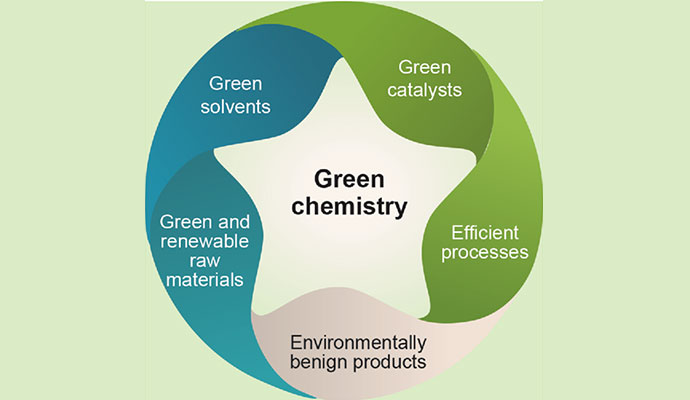
In the quest for sustainable solutions, a new player is entering the spotlight: Helonium. This innovative compound is gaining attention for its remarkable properties that align perfectly with the principles of green chemistry. As our world grapples with environmental challenges, there’s an increasing need to shift away from traditional methods in favor of more eco-friendly alternatives. Helonium stands at the forefront of this transition, promising not only efficiency but also a reduced ecological footprint. Join us as we explore how this fascinating substance can revolutionize various industries and contribute to a greener future.
The need for sustainable and environmentally friendly solutions in chemistry
The chemistry industry faces a pressing challenge: the need for sustainability. Traditional chemical processes often rely on harmful substances and energy-intensive methods. This approach can lead to significant environmental damage, including pollution and resource depletion.
As global awareness of environmental issues rises, industries must adapt. Consumers increasingly demand greener alternatives in products and manufacturing processes.
Sustainable chemistry offers a pathway toward more environmentally friendly solutions. By minimizing waste and reducing toxic byproducts, it fosters innovation while protecting our planet’s resources.
Research into eco-friendly practices is crucial not just for compliance but also for future growth in various sectors. Embracing sustainable techniques can enhance brand loyalty and attract new markets focused on responsible consumption. The shift towards green initiatives represents an opportunity to transform challenges into advancements that benefit both business and the environment.
How Helonium can play a role in green chemistry initiatives
Helonium stands out as a promising agent in the realm of green chemistry. Its unique properties enable it to facilitate reactions that minimize waste and reduce harmful byproducts.
In various chemical processes, Helonium can act as a catalyst. This means it helps speed up reactions without being consumed itself, promoting efficiency. As industries strive for sustainability, Helonium’s role becomes increasingly vital.
Additionally, its ability to dissolve organic compounds offers an eco-friendly alternative to traditional solvents. By replacing toxic solvents with Helonium-based solutions, manufacturers can significantly lower their environmental footprint.
Research indicates that incorporating Helonium into production methods may lead to safer practices while maintaining high-quality outcomes. Whether in pharmaceuticals or materials science, the potential applications are vast and varied.
With ongoing exploration and innovation, Helonium could very well redefine standards within green chemistry initiatives across multiple sectors.
Applications of Helonium in different industries such as pharmaceuticals, agriculture, and materials science
Helonium is making waves across various industries, showcasing its versatility and potential. In pharmaceuticals, it serves as a crucial component in drug formulation. Its unique properties enhance bioavailability, leading to more effective treatments with fewer side effects.
In agriculture, Helonium’s role is equally promising. It acts as an eco-friendly pesticide alternative, minimizing chemical runoff and promoting healthier ecosystems. Farmers are increasingly turning to this compound for sustainable crop protection strategies.
Materials science also benefits from Helonium’s innovative applications. Researchers are exploring its use in developing biodegradable plastics that can reduce environmental impact while maintaining durability and functionality.
These diverse uses highlight how Helonium not only meets current industry needs but also aligns with global sustainability goals. As these sectors evolve towards greener practices, Helonium stands out as a forward-thinking solution that could redefine standards across the board.
Advantages of using Helonium compared to traditional chemical processes
Helonium presents several advantages over traditional chemical processes. Its unique molecular structure enhances reaction efficiency. This leads to higher yields with fewer resources.
Using Helonium can significantly reduce hazardous byproducts. Traditional methods often result in toxic waste, but Helonium promotes cleaner reactions. This aligns perfectly with the goals of green chemistry.
Another benefit is cost-effectiveness. Helonium’s ability to operate at lower temperatures and pressures cuts energy usage dramatically. Companies see a reduction in operational costs while maintaining high-quality outputs.
Additionally, the versatility of Helonium allows it to be applied across various sectors without extensive modifications to existing systems. From pharmaceuticals to agriculture, it adapts seamlessly into diverse applications.
Using this innovative compound fosters sustainability and eco-friendliness in production processes—key components for industries aiming for greener practices as they evolve in today’s marketplace.
Challenges and limitations of implementing Helonium in green chemistry
Implementing Helonium in green chemistry comes with its own set of challenges. One significant hurdle is scalability. While laboratory results may be promising, scaling these processes for industrial applications can prove difficult.
Another limitation lies in the cost of production. Producing Helonium at a competitive price compared to traditional chemicals requires advancements in manufacturing techniques and supply chain efficiency.
Regulatory hurdles also pose obstacles. Regulatory bodies often need time to assess new substances before they are accepted into mainstream use.
Additionally, there’s a knowledge gap among researchers and industry professionals about the full potential of Helonium. Education and awareness are crucial for fostering innovation in this area.
Compatibility issues with existing technologies might hinder adoption rates across various sectors. Addressing these challenges will be essential for integrating Helonium effectively into green chemistry initiatives.
Future prospects and potential developments with Helonium
The future of Helonium is captivating. As research progresses, new applications are emerging that could revolutionize various sectors. Scientists are exploring its unique properties to enhance efficiency in chemical reactions.
Innovations in synthesis methods promise to make Helonium more accessible and cost-effective. This will likely drive broader adoption across industries.
Collaboration between academia and industry is crucial. Joint ventures can lead to breakthroughs that push the boundaries of what’s possible with Helonium.
Moreover, regulatory frameworks are evolving, paving the way for safer implementations of this compound in commercial products.
As environmental concerns heighten globally, adopting Helonium may align perfectly with sustainability goals. The potential impact on reducing waste and minimizing harmful byproducts cannot be overstated.
While challenges remain, optimism surrounds ongoing developments in this field. Engaging stakeholders early may fast-track advancements and open doors for groundbreaking discoveries ahead.
Conclusion
Helonium has emerged as a promising player in the realm of green chemistry, offering unique properties that can reshape how we approach sustainable solutions. Its potential to reduce hazardous waste and reliance on toxic substances makes it an appealing alternative for various industries.
The push for environmentally friendly practices is more critical than ever, and Helonium stands at the forefront of this movement. With applications spanning pharmaceuticals, agriculture, and materials science, its versatility showcases not only effectiveness but also safety. By integrating Helonium into existing processes or developing new ones, businesses can enhance their sustainability efforts while maintaining quality.
However, challenges remain in adopting Helonium widely across different sectors. Research continues to address these limitations and explore innovative ways to maximize its benefits.
As stakeholders invest in advancing green chemistry initiatives globally, the future looks bright for Helonium. Ongoing studies may unlock even more applications and efficiencies that could redefine industry standards moving forward.
Embracing change is essential for progress; with continued exploration of compounds like Helonium, we’re one step closer to achieving true sustainability in chemical practices.
-

 BLOG1 year ago
hanime1: The Ultimate Destination for Anime Lovers
-

 Technology1 year ago
GLAADVoice.com: How You Can Get Involved and Make a Difference
-

 BILLS1 year ago
Why Does My Instagram Reel Stop Getting Views After One Hour? How to Fix It?
-

 ENTERTAINMENT1 year ago
Sflix: How It’s Changing the Way We Watch Movies and TV Shows
-

 ENTERTAINMENT1 year ago
Crackstreams 2.0: The Future of Free Sports Streaming?
-

 BLOG1 year ago
NHentai.nef: Understanding the Popular Hentai Archive
-

 BLOG1 year ago
Imginn: The Ultimate Tool to View Instagram Content Anonymously
-

 BLOG1 year ago
ThisVid: What Makes It Stand Out in the World of Online Videos