
BLOG
How to Reset Windows 11 PC Without Losing Data?

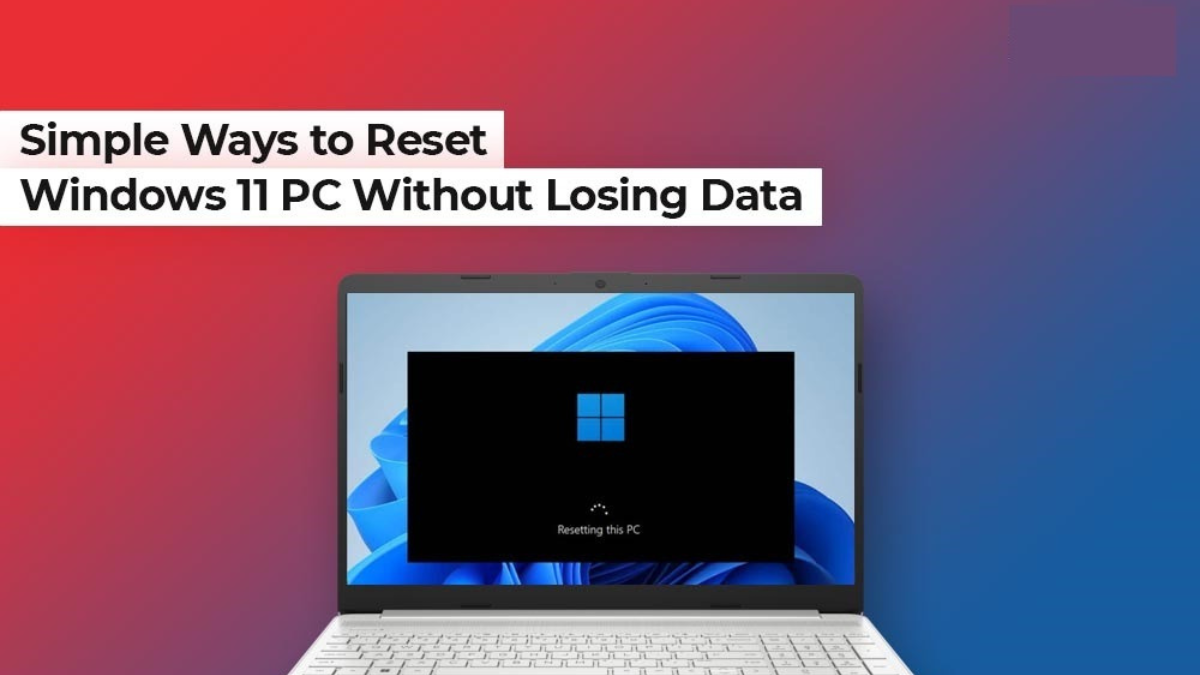
Windows 11 is known for its smooth, modern computing experience. However, over time, your Windows 11 PC may start to slow down due to software conflicts, corrupted system files, malware, or unwanted applications. In such cases, you can reset your Windows 11 PC to restore performance and fix system errors. Resetting the device can sometimes lead to data loss, potentially resulting in the deletion of documents, photos, videos, and other personal files.
Fortunately, several methods are available online that you can try to reset Windows 11 PC without losing data. In this guide, we will explain everything you need to know about resetting Windows 11 PC without losing data, including when you should opt PC reset and how to do it without experiencing data loss. Let’s get started!
When Should You Reset a Windows 11 PC?
Before applying any methods to reset your Windows 11 PC, it’s important to understand the situations in which resetting your computer is the right decision. This includes:
- Severe Performance Issues: If your computer is performing extremely slowly, even after cleaning temporary files and uninstalling unnecessary programs, then resetting can help.
- Frequent System Crashes: Issues like frequent Blue Screen errors or unexpected shutdowns can be easily resolved by resetting the PC.
- Malware or Virus Infection: If your PC is infected with viruses or malware and antivirus scans don’t fix the issue, resetting it may help remove the threat.
- Corrupted System Files: When Windows features are not working properly due to damaged or missing system files, try resetting them.
- Software Conflicts: If recently installed programs are triggering serious system errors and affecting overall performance stability, then you may reset them to fix the issue.
A reset can fix most software-related problems without requiring a complete format.
How do I Reset Windows 11 PC without Data Loss? [Quick Methods]
Now that you are familiar with different situations when you should reset a Windows 11 PC, it’s time to explore different resetting methods. These methods will help you reset your computer without data loss:
Method 01: Reset PC Using the Settings App
Windows in-built Settings app is the best way to reset your PC without losing personal data. It provides a “Keep my files” option, which keeps your personal file intact even after resetting it. To reset your PC, you have to:
- Press the Windows + I keys to launch the Settings app.
- Go to the System tab and then click on Recovery.
- Under “Recovery options”, click the Reset PC button next to Reset this PC.
- Now, select the Keep my files
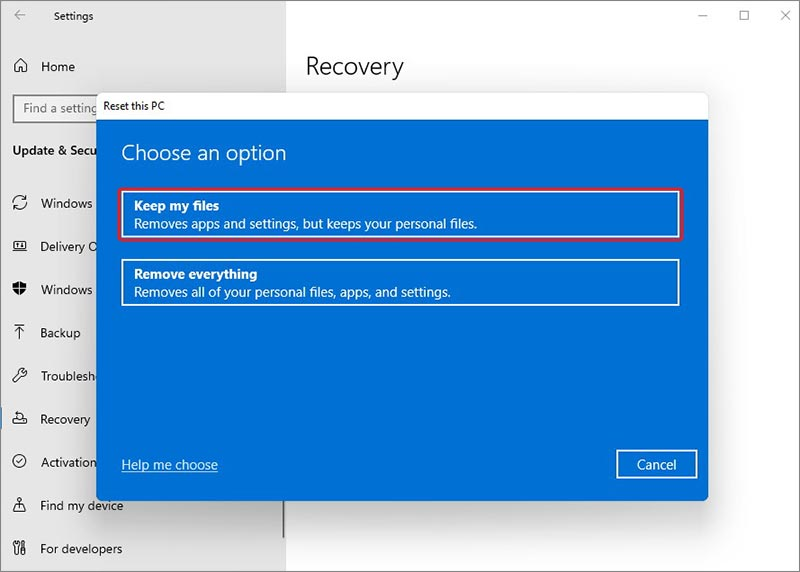
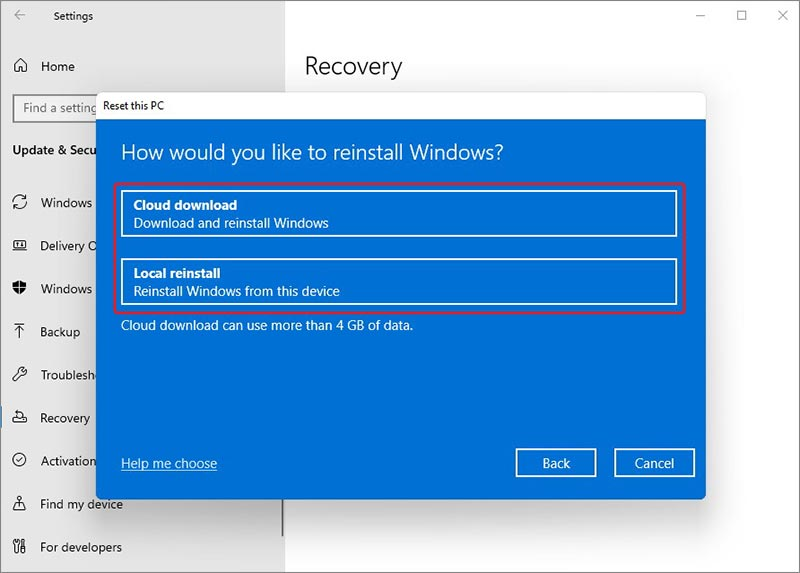
- From the next dialogue box, choose from where you want to restore files, i.e., either Cloud download or Local reinstall.
- Click Next and then finally hit Reset to confirm.
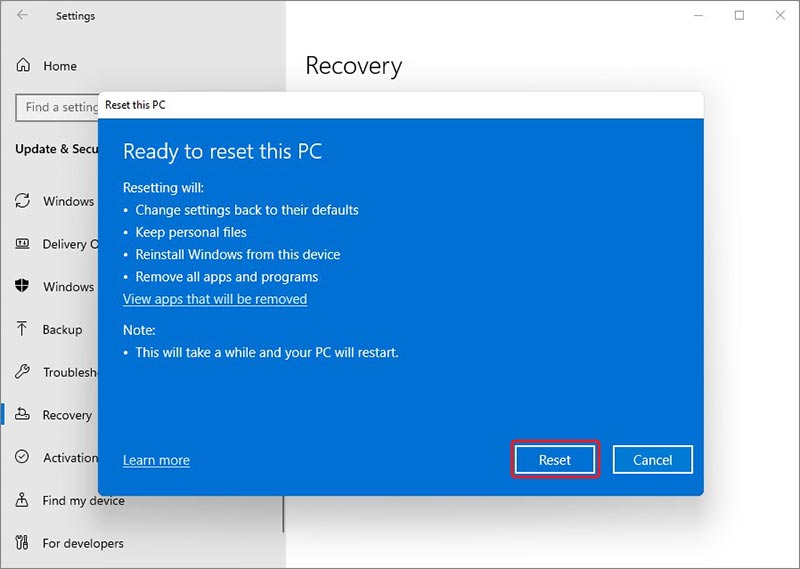
Your PC will restart several times. The process may take 20–60 minutes, depending on system speed.
Method 02: Reset Windows 11 from Advanced Startup
If your PC is not booting properly or fails to load Windows normally due to system errors or startup issues, then you can use the built-in Advanced Startup feature to reset it. All you have to do is:
- Firstly, you need to restart your PC.
- When the Windows logo appears, press and hold the power button to force shutdown. Repeat this process 2-3 times.
- Now, Windows will enter Automatic Repair.
- Click Troubleshoot, then select Reset this PC.
- Again, choose Keep my files.
Then carefully follow the on-screen instructions to complete the reset process successfully.
What if Your Data is Lost after Windows 11 Reset?
Instances may happen when your important files get deleted after Windows 11 PC reset. In such cases, you can use previously created backups or third-party Windows data recovery software to restore your lost data. Tools like Stellar Data Recovery Standard are specifically designed to scan your device for lost data and recover deleted files and folders. This all-in-one solution performs a thorough scan to locate and restore missing data efficiently.
Key Features of Stellar Data Recovery Standard:
- The Stellar Data Recovery tool supports recovery of files deleted due to accidental deletion, formatting, system failure, resetting, and many other reasons.
- It allows you to recover files deleted from various internal and external storage devices, including memory cards, USB drives, external hard drives, etc.
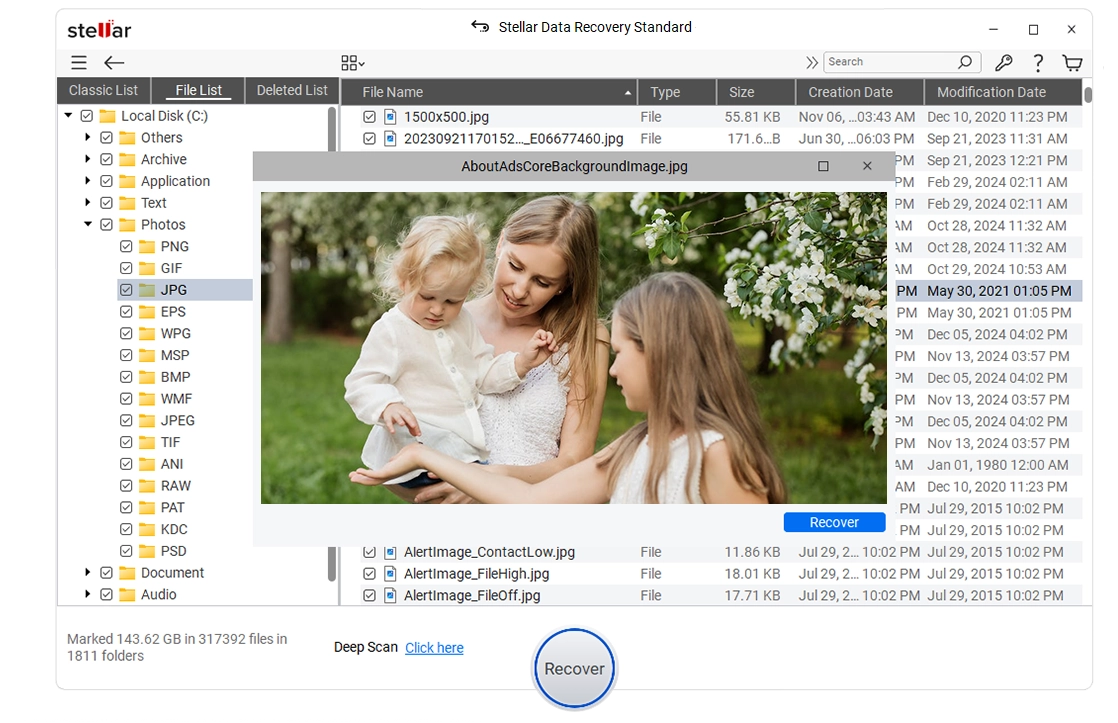
- The preview feature lets you preview the recoverable files before saving them on your PC.
- This Windows data recovery software is available in multiple versions, varying in features and prices.
Here’s how to recover data from a Windows 11 PC after reset using this Windows data recovery software:
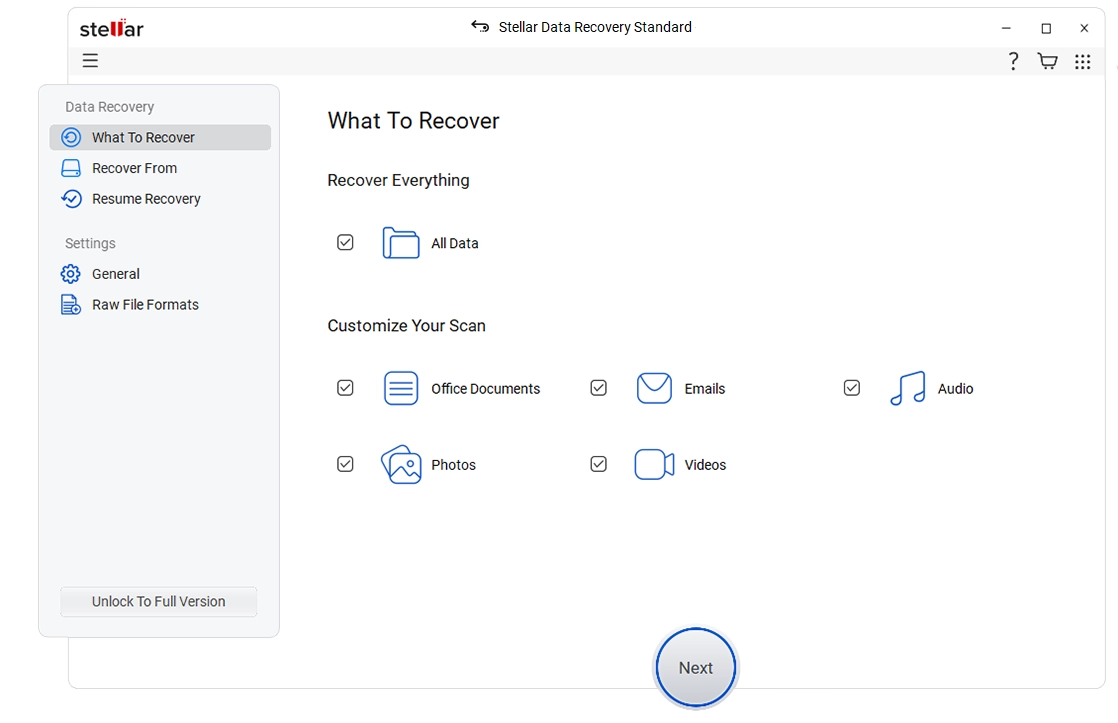
Step 1: Download and install the Stellar Data Recovery Standard software on your Windows 11 PC. Launch the software and from the homepage, select All Data or the type of data you need to restore. Click Next to continue.
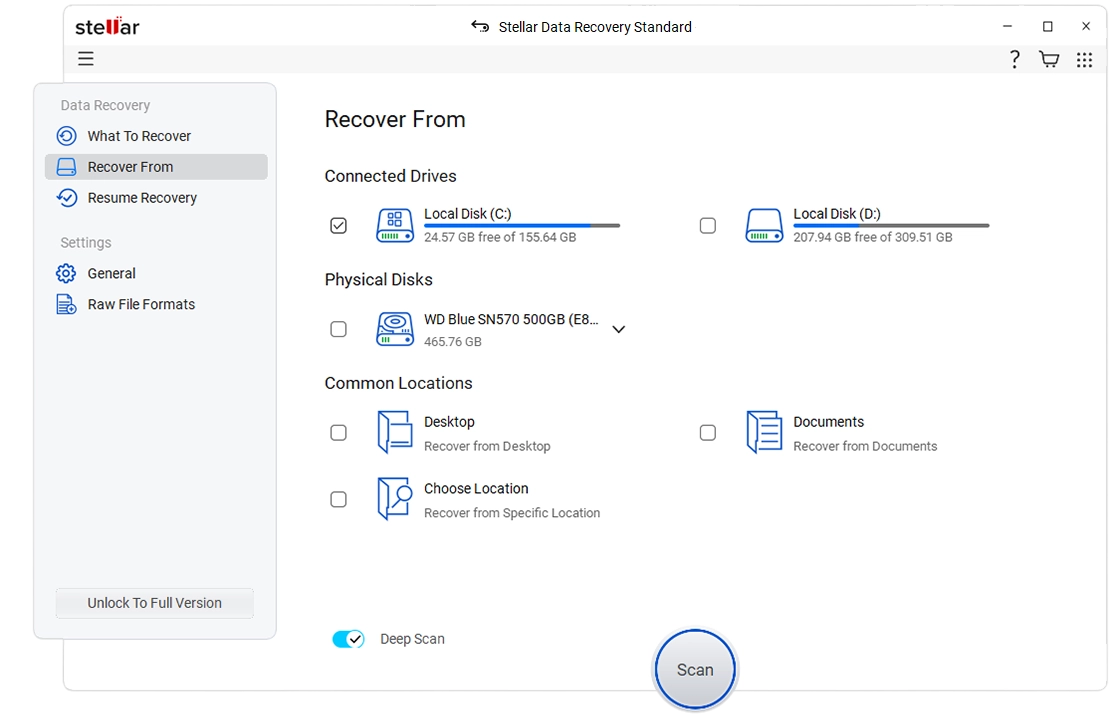
 Step 2: Select the folder location where your deleted file(s) were stored and click Scan to initiate the scanning process.
 Step 3: Once the scan is complete, preview the recoverable files and select the one you want to restore. Click Recover to save selected files back to your PC.
 Wrapping Up
Resetting a Windows 11 PC without losing data may seem like a challenging task, but it’s quite easy. You can go with the aforementioned methods one by one to fix performance issues, system errors, and software problems on your Windows PC by resetting it. The “Keep my files” option allows you to reinstall Windows while protecting your personal data. However, always remember to create a backup before proceeding. If your PC crashes unexpectedly, you can use tools like Stellar Data Recovery Standard to get your lost files back.
By following the methods explained above, you can confidently reset your Windows 11 PC and enjoy a fresh, smooth computing experience once again.
Frequently Asked Questions (FAQs)
Does Resetting Windows 11 PC always delete files?
No. If you choose the “Keep my files” option, your personal data, such as documents, photos, and videos, will remain safe. However, installed applications will be removed.
How long does it take to reset a Windows 11 PC?
The reset process typically takes from 20 to 60 minutes, depending on your system performance and the method selected.
Is it necessary to back up data before resetting?
Yes, creating a backup of your important files prevents accidental data loss due to unexpected interruptions.

Saint Vanity Clothing earns its place in a wardrobe the quiet way. It does not rely on loud graphics or complicated styling rules. Instead, it offers simple pieces that fit into ordinary days: commutes, flights, and weekends out.
At the centre of the range sit two pieces that most people reach for first. The Saint Vanity Shirt brings a clean, put-together feel. The Saint Vanity Hoodie brings comfort and an easy layer for cooler hours. Together, they cover a surprising amount of real life.
This guide looks at how the range works across three settings: work, travel, and weekends. The goal is practical: fewer morning decisions, and pieces that move between settings without a full outfit change.
For Work: Clean Lines and Quiet Confidence
Work dressing is mostly about looking considered without looking overdone. A Saint Vanity Shirt fits that brief well. Worn with straight trousers, it reads neat and intentional, and it layers cleanly under a blazer or a simple jacket.
The key is keeping the rest of the outfit simple. Dark trousers, clean shoes, and one layer on top are usually enough. A Saint Vanity Shirt does not need bold accessories to carry the look. Its role is to sit quietly at the centre of the outfit.
On more casual workdays, a Saint Vanity Hoodie can work too, especially in creative or relaxed offices. The trick is pairing it with smarter pieces: tailored trousers instead of joggers, and clean trainers or simple shoes. The hoodie softens the outfit, while the trousers keep it grounded.
For Travel: Pieces That Pack and Keep Up
Travel rewards a small, hardworking wardrobe. Saint Vanity Clothing suits that approach because the pieces are easy to combine. A Saint Vanity Shirt and a Saint Vanity Hoodie, packed with one pair of trousers and one pair of jeans, can cover several days without repeating the same outfit twice.
Layering is the main idea. A Saint Vanity Shirt works as a base layer under a jacket on a cool morning, and on its own when the afternoon warms up. A Saint Vanity Hoodie adds warmth on flights, trains, and evening walks, and it doubles as a comfortable layer for long stretches of sitting.
Packing light also means choosing pieces that do not demand special care on the road. Simple shapes and plain colours make that easier. A hoodie in a neutral tone pairs with almost anything in the bag, and a Saint Vanity Shirt can shift from daytime sightseeing to an evening meal with a change of shoes and a jacket.
For a short trip, think in outfits rather than individual items:
- Day one: shirt with jeans for arrival and exploring
- Day two: hoodie with trousers for a relaxed day out
- Evening: the same shirt, layered under a jacket, for dinner
- Travel day: hoodie layered over the shirt for the journey home
That kind of rotation keeps the bag light and the choices simple.
For Weekends: Relaxed Dressing Without the Effort
Weekends are where Saint Vanity Clothing feels most at home. The pace is slower, the plans are looser, and the outfit should follow. A Saint Vanity Hoodie with jeans and trainers is the default for errands, coffee, and long walks, and it rarely needs much thought.
A Saint Vanity Shirt has a weekend role too. It works for lunches, family visits, and days when jeans and a tee feel a little too casual. Worn open over a plain tee, or on its own with relaxed trousers, it lifts the outfit without making it feel formal.
The weekend is also a good time to play with proportions. A slightly longer hoodie over slim trousers, or a shirt with the sleeves rolled, changes the feel of the outfit without adding new pieces. Small adjustments like these keep a small wardrobe feeling fresh.
One Small Rotation Across Three Settings
The real strength of Saint Vanity Clothing shows when the same pieces serve work, travel, and weekends. A tight rotation avoids the common problem of owning plenty of clothes and still feeling stuck each morning.
A practical starting rotation looks like this:
- Two shirt options for work and evenings
- One Saint Vanity Hoodie for travel, layering, and weekends
- One pair of dark trousers and one pair of jeans
- One simple jacket for cooler weather and smarter settings
- Clean trainers and one smarter pair of shoes
With that set, the shirt handles the polished days, the hoodie handles the relaxed ones, and the layers bridge the gap between them. Nothing in the rotation only works in one setting, which is the point.
Rotation also makes getting dressed faster. When every piece works with every other piece, mornings get simpler. The range is designed for that kind of easy mixing, with simple shapes that sit well together.
Colour and Layering Choices That Keep It Simple
Colour is where many outfits go wrong, usually by adding too much of it. With Saint Vanity Clothing, a simple palette does the heavy lifting. Black, white, grey, and navy cover nearly every setting in this guide, and they let the shirt and the hoodie swap roles without clashing.
Layering follows the same rule. Start with the shirt as the base, add the Saint Vanity Hoodie when warmth is needed, and finish with a jacket for the most polished or coldest moments. Each layer should stay visible, so the outfit keeps its shape all day.
A few habits help the system hold together:
- Keep the palette to two or three colours per outfit
- Let one piece lead, and keep the rest quiet
- Match the shoe to the setting, not just to the top
- Save brighter colours for one accent, not the whole outfit
These are small rules, but they are what turn two simple pieces into a wardrobe that works across work, travel, and weekends.
Frequently Asked Questions
What is Saint Vanity Clothing known for?
The range is known for simple, modern streetwear pieces that fit everyday life. It focuses on clean shapes and easy styling, which makes the pieces simple to wear across different settings.
Can a Saint Vanity Shirt work for the office?
Yes, it works well for most offices when paired with straight trousers and clean shoes. Layering it under a blazer or a simple jacket keeps the look neat, and its clean shape needs no bold accessories to look finished.
Is a Saint Vanity Hoodie suitable for travel?
It is a strong travel piece because it layers well and stays comfortable over long days. It gives warmth on flights and evening walks, and it pairs with jeans and trousers, so it earns its place in a small travel bag.
How do I pack for a short trip?
Pack one Saint Vanity Shirt, one Saint Vanity Hoodie, one pair of trousers, and one pair of jeans, plus a simple jacket. That set covers daytime exploring, evenings out, and the journey home, with layers doing the work of extra outfits.
What should I pair with a Saint Vanity Shirt on weekends?
On weekends, it pairs well with relaxed trousers or jeans and clean trainers. Worn open over a plain tee, it adds a little structure to a casual day without making the outfit feel formal.
Can a Saint Vanity Hoodie be layered for work?
In relaxed or creative workplaces, it layers well with tailored trousers and simple shoes. The smarter bottom half keeps the outfit grounded, while the hoodie keeps it comfortable through a long day.
How many pieces do I need for a week of outfits?
A small rotation of Saint Vanity Clothing can cover a week: two shirts, one hoodie, two bottoms, and one jacket. Because the pieces mix freely, that set produces more outfits than the item count suggests.
Are the shirts and hoodies easy to mix and match?
Yes, the simple shapes and plain colours across Saint Vanity Clothing make mixing easy. A shirt and a hoodie share the same quiet style language, so they pair with each other and with most everyday bottoms.
What colours work best across work, travel, and weekends?
Black, white, grey, and navy are the safest choices across all three settings. They keep outfits calm, mix without clashing, and let one brighter accent stand out.
Where should I start if I am new to Saint Vanity Clothing?
Start with one shirt and one hoodie in neutral colours. Those two pieces cover work, travel, and weekends, and they show how the range works before you add more to the rotation.
Conclusion
Saint Vanity Clothing works best when it is treated as a system, not a collection of separate pieces. The shirt covers the polished moments, the hoodie covers the relaxed ones, and together they move between work, travel, and weekends with very little effort.
That everyday versatility is part of a wider streetwear story, where a well-chosen streetwear hoodie can anchor outfits far beyond one occasion. The pieces in this guide follow the same idea: simple shapes, quiet colours, and layers that earn their place by working in more than one setting.
Start small, keep the palette simple, and let the rotation do the work. With a Saint Vanity Shirt, a Saint Vanity Hoodie, and a few dependable bottoms, most days already have an outfit waiting.

A Chinook can push Calgary temperatures from well below freezing to above zero in a matter of hours, then drop them back again just as fast. Your hot tub can handle these swings, but a few simple habits will protect the cover, the water and the equipment while the weather changes around them.
What a Chinook does to a hot tub
When warm, dry wind arrives, snow on and around your spa melts quickly. Meltwater pools on the cover, soaks into seams and runs toward the cabinet. When the temperature falls again, that water refreezes into heavy ice. The repeated freeze-thaw cycle is harder on a spa than steady cold, because it adds weight, moisture and stress to parts that are built to stay dry.
Protect the cover first
Brush snow off the cover before a forecast Chinook so there is less to melt. After the warm spell, clear any standing water or slush before it refreezes. Check the cover’s fold line and skirt for ice, which can stop the cover from sealing properly and let heat escape.
Keep an eye on water chemistry
Warm days tend to bring more people into the tub, and more bathers mean faster sanitizer use. Test the water after a busy Chinook weekend and top up sanitizer as needed. Dry Chinook winds can also increase evaporation, so check the water level and keep it above the skimmer opening.
Do not turn the heat down too far
It can be tempting to lower the set temperature during a mild spell. In practice, a big drop forces the heater to work hard when the cold returns that evening. Keeping a steady temperature, or lowering it only slightly, is usually more efficient and gentler on the equipment.
Watch drainage around the base
Make sure meltwater can drain away from the cabinet. Water that collects under the tub and freezes can lift pavers, crack pads and soak the cabinet insulation. A slight slope or a gravel base helps a lot.
Choose equipment built for Alberta weather
Spas designed for Canadian winters, with full-foam or thick perimeter insulation and tight-fitting covers, cope better with rapid temperature changes. That is why many owners shopping for Calgary hot tubs pay close attention to insulation and cover quality before price. If you want year-round exercise as well as relaxation, a Calgary swim spa gives you a heated pool for swimming against a current, with the same need for a solid cover and good insulation.
A quick Chinook routine
- Clear snow from the cover before the warm wind arrives.
- Remove slush and standing water before it refreezes.
- Test sanitizer and water level after heavy use.
- Keep the set temperature steady.
- Check that meltwater drains away from the cabinet.
Follow these steps each time a Chinook rolls in and your hot tub will ride out Calgary’s unpredictable winter without trouble.
BLOG
Best Visual Diagram and Mind Mapping Tools for Education: Features and Collaborative Whiteboard Options for 2026

The best visual diagram and mind mapping tools for education pair a way to organize ideas with a collaborative whiteboard. Adobe Acrobat’s mind map maker covers the organizing step: upload notes or slides as PDF, DOCX, PPTX, XLSX, or TXT files, and it builds a mind map with the source shown behind select branches, with no sign-up required.
Teachers and students who want to turn scattered thoughts into clear visual diagrams usually need three kinds of tool: a shared canvas for live group work, a mind or concept map for structure, and a diagramming tool for exact layouts such as flowcharts. The sections below match tools to each need and note what the free education access includes.
What Collaborative Whiteboard Should You Use in Education?
Pick the whiteboard that fits your school’s existing accounts. Miro’s free plan allows unlimited members but only three editable boards, while its Education plan includes unlimited boards for students, free for two years, and for educators, free indefinitely. FigJam is free for verified students and educators and includes a mind map template. Microsoft Whiteboard has always been free for students and education professionals through the Microsoft 365 A1 offer, includes more than 60 templates, and lets teachers choose read-only or collaboration mode before creating each whiteboard, which helps when you want students to view an example before they edit. Canva’s whiteboard templates include concept maps, and Canva Education is free for K-12 teachers and students.
Best Educational Mind Mapping and Concept Mapping Diagram Tools: Education Features to Look for in 2026
Compare tools on five features: free education access, the way students collaborate, templates, export options, and links back to source material. Adobe Acrobat’s mind map maker shows the original source behind select branches, and CmapTools lets you attach resources to concepts. Miro’s free plan includes 10 AI credits a month, MindMeister’s free plan includes AI map creation in beta, and Mindomo’s free plan includes one AI credit. Exports differ too: Coggle’s free plan includes PDF and image download, while Miro’s free plan allows only low-resolution board exports. Check how each tool treats student accounts before the term starts, because a feature that is free for teachers may be limited for students. The table summarizes the education features of each tool.
| Platform | Education features | Free access |
| Adobe Acrobat mind map maker | Mind map from uploaded files; source shown behind select branches | Free, no sign-up required; files up to 100MB each |
| CmapTools | Concept maps with attached resources | Free for educational use; free Cmap Cloud account |
| Miro | Shared boards; Education plan with unlimited boards | Free plan has 3 editable boards |
| FigJam | Classroom templates, including a mind map | Free for verified students and educators |
| Microsoft Whiteboard | Teacher-controlled read-only or collaboration mode | Free for students and education professionals through Microsoft 365 A1 |
| Lucidchart | Diagrams with 100 templates | Free plan has 3 editable documents; education keeps the same limit |
| Coggle | Real-time mind maps with PDF and image download | Free plan has 3 private diagrams |
| MindMeister | Mind maps with AI creation in beta | Free plan has 3 mind maps |
Best Visual Thinking Diagram Tools for Education Concept Mapping
Concept mapping needs labeled links, so choose a tool that handles lines and text well. CmapTools is built for the job and, according to IHMC, supports linking words that turn each pair of concepts into a statement. It is free for educational use and has a free Cmap Cloud account and a web version. Lucidchart suits cleaner diagrams, with a free plan of three editable documents, 75 shapes each, and 100 templates. diagrams.net is free with no sign-up required, and you choose where files are saved. Canva offers free concept map templates. Adobe Acrobat’s mind map maker makes mind maps rather than labeled concept maps, so use it for a first draft. Start each map with a focus question. Check that students can save their map as a file for assessment.
Education Mind Map Diagram Collaboration: How Do Students Work Together?
Choose a tool that lets the whole group edit one map. Coggle’s free plan includes real-time collaboration, sharing by link or QR code, and full change history, which lets you review how a map developed. MindMeister’s free plan allows unlimited collaborators on up to three maps. Miro’s free plan includes unlimited members, but every board is open to all team members by default. With Adobe Acrobat, signed-in students can create a shared Student Space and invite classmates with a link. Assign roles, such as one person who builds the structure and another who checks sources, and keep one shared map per project so work does not split across versions. Ask each student to add a short note on what they changed.
Frequently Asked Questions
Should a class start with a whiteboard or a mind map?
Start with a whiteboard when the goal is live brainstorming, and a mind map when the goal is organizing what you already know. Use a concept map when relationships matter, since labeled links make each connection explicit. Many classes use two: a whiteboard to gather ideas, then a map to structure them.
How can teachers keep student collaboration on track?
Use the controls each tool offers. Microsoft Whiteboard lets teachers choose read-only or collaboration mode before creating each whiteboard, and Miro’s Education plan gives teachers unlimited boards. Set a focus question, assign roles, and check the map’s change history or board activity before the final discussion.
Are these tools free for schools?
Often, for students and educators. Miro’s Education plan, FigJam, Microsoft Whiteboard, and CmapTools all have free education access, and Canva Education is free for K-12. Free plans still have limits, such as three editable documents on Lucidchart, so confirm the details with your school’s technology team. Miro’s student access lasts two years, so plan for renewal.
-

 BLOG1 year ago
hanime1: The Ultimate Destination for Anime Lovers
-

 Technology1 year ago
GLAADVoice.com: How You Can Get Involved and Make a Difference
-

 BLOG1 year ago
Imginn: The Ultimate Tool to View Instagram Content Anonymously
-

 BILLS1 year ago
Why Does My Instagram Reel Stop Getting Views After One Hour? How to Fix It?
-

 ENTERTAINMENT1 year ago
Crackstreams 2.0: The Future of Free Sports Streaming?
-

 BLOG1 year ago
ThisVid: What Makes It Stand Out in the World of Online Videos
-

 ENTERTAINMENT1 year ago
Sflix: How It’s Changing the Way We Watch Movies and TV Shows
-

 BLOG1 year ago
NHentai.nef: Understanding the Popular Hentai Archive