
BLOG
Best AI Video Generator Tools in 2026: Top 10 Platforms Reviewed


Video creation has changed fast. What used to take days of editing now takes minutes. In 2026, AI video generators are no longer just experiments. They are real tools people use every day to create ads, tutorials, social clips, and even cinematic scenes.
I have tested and followed many of these tools closely. Some focus on avatars, some on short videos, and some aim for full cinematic output. In this guide, I will walk through the best AI video generator tools in 2026, explain what each one does well, and help you decide which one fits your needs.
This list is not ranked by hype. It is based on real use cases, output quality, and how practical each tool is right now.
What Is an AI Video Generator
An AI video generator is a tool that creates videos using text, images, audio, or a mix of them. You describe what you want, upload assets if needed, and the system generates the video for you.
Some tools focus on talking avatars. Others focus on cinematic scenes or short social clips. The best AI video generator is not the same for everyone. It depends on what kind of video you want to make and how much control you need.
How I Evaluated These Tools
I used four simple criteria.
First, video quality. The output needs to look clean and intentional.
Second, ease of use. A good tool should not slow you down.
Third, flexibility. Can it handle different styles or formats
Fourth, real use cases. Does it actually solve a problem
With that in mind, here are the top tools.
What Are the Best AI Video Generators in 2026?
1. Loova
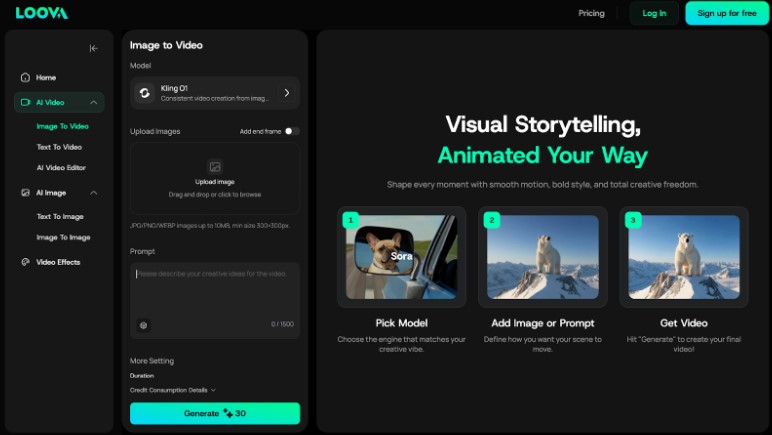
Loova makes creating content super easy. It’s an all-in-one platform where you can generate videos, images, and music using top AI models like Sora 2 Pro, VEO 3.1, and Kling O1. No need to juggle multiple subscriptions or platforms anymore.
You can turn text into video, image to video, or even switch up video styles, all in one place. Plus, there are viral effects, ready-made templates, and editing tools to speed up the creative process and make your content stand out.
Key Features:
- Access to top AI models in one place
- Supports text, image, and video inputs
- Text-to-video, image-to-video, and AI video editing
- Image to Image, Text to image
- Viral effects, templates, and creative editing tools
- Fast output with customizable settings
Best For:
- Content creators and influencers
- Filmmakers and video producers
- Social media teams
- Designers and creatives
2. Synthesia
Synthesia is known for AI avatars, and that has not changed in 2026. If you need a talking presenter without filming a real person, this tool does the job well.
The avatars look clean and professional. Lip sync is solid, and the voice options cover many languages. This makes it popular for training videos, internal communication, and onboarding content.
That said, Synthesia is not designed for creative storytelling or cinematic visuals. It works best when the goal is clear communication, not visual flair.
Best For:
- Training videos
- Internal updates
- Educational content
3. Kling
Kling is built for creators who care about realism. It focuses on detailed scenes, natural motion, and cinematic composition.
The output can look impressive, especially for short narrative clips. Lighting and movement feel more natural than most tools in this category.
The downside is control. You often need to experiment with prompts to get exactly what you want. It is powerful, but not always predictable.
If you enjoy exploring creative prompts and want high quality visuals, Kling is worth your time.
Best For:
- Creative storytelling
- Cinematic scenes
- Visual experiments
4. Wan AI
Wan AI focuses on short form content. It is designed for quick social videos that follow trends and formats people already recognize.
Templates are simple, and generation is fast. You can go from idea to video in minutes, which matters if you post often.
It does not aim for high realism or long videos. It aims for speed and relevance. For many creators, that is enough.
Best For:
- Short social videos
- Trend based content
- Quick posts
5. VEO 3 and VEO 3.1
VEO is one of the most advanced text to video models available in 2026. It focuses on full scenes with smooth motion and strong visual consistency.
The output feels closer to film than most AI videos. Camera movement, depth, and pacing are handled well.
This level of quality comes with complexity. VEO is not a casual tool. It is better suited for teams, studios, or creators who are comfortable working with detailed prompts.
Best For:
- High end video generation
- Cinematic projects
- Concept visuals
6. Sora
Sora is built around storytelling. You describe a scene, and it tries to bring that description to life with coherent motion and structure.
One thing Sora does well is maintaining logic across frames. Characters and environments stay consistent, which is hard for AI video.
Like VEO, it requires careful prompting. When it works, the results are impressive. When it misses, it can feel unpredictable.
Best For:
- Narrative videos
- Concept storytelling
- Idea exploration
7. Hailuo
Hailuo focuses on speed and simplicity. It creates short clips that work well for ads and quick messages.
The interface is straightforward, and the learning curve is low. You will not get cinematic depth, but you will get usable videos fast.
It is a good option if you need content quickly and do not want to overthink the process.
Best For:
- Short ads
- Fast content creation
- Simple visuals
8. Seedance
Seedance takes a different approach by focusing on audio and rhythm. It creates videos that react to music and sound.
This makes it interesting for creators working with music, motion graphics, or visualizers. The output feels dynamic and timed, rather than static.
It is not a general purpose tool, but within its niche, it performs well.
Best For:
- Music visuals
- Rhythm based content
- Creative motion
9. Pixverse
Pixverse is built for visual style. It offers strong artistic control and stylized outputs.
Instead of aiming for realism, Pixverse leans into creative looks. This makes it useful for branding, art projects, and experimental visuals.
If style matters more than realism, Pixverse is a good option.
Best For:
- Artistic videos
- Stylized content
- Creative branding
10. Pika
Pika is simple, playful, and easy to use. It is designed for quick creative clips rather than polished production.
You can generate short videos with fun effects and ideas without much setup. It is not built for serious marketing or long form content, but it is great for exploration.
Best For:
- Creative experiments
- Short clips
- Casual use
How to Choose the Best AI Video Generator for You
I always start with one question. What kind of video do I actually need
If you are looking to try all kinds of AI models in the market without paying for all of the plans, an all-in-one tool like Loova saves money.
If you need training content, avatars from Synthesia make sense.
If you care about visual realism, Kling, VEO, or Sora are better options.
If speed matters most, Wan AI or Hailuo will feel easier.
There is no single best AI video generator for everyone. The best one is the one that fits your workflow.
Final Thoughts
AI video generation in 2026 is practical, not experimental. These tools are already shaping how people create content.
I recommend starting with one tool that matches your main goal. Do not chase every feature. Focus on what helps you publish faster or tell better stories.
If you want a tool that balances speed, quality, and flexibility, Loova is a strong place to start. It fits real workflows and does not get in the way of creation.
FAQs
What is the best AI video generator in 2026?
There is no single answer. For creative and AI video generation, Loova is very practical. For avatars, Synthesia works well.
Are AI video generators good enough for professional use?
Yes. Many businesses already use them for ads, training, and product videos. The key is choosing the right tool for the job.
Can I create videos without editing skills?
Most of these tools are designed for non editors. You mainly work with text prompts, templates, or simple inputs.
Are free plans enough to get started?
Loova’s free plans are good for testing. If you create videos regularly, paid plans usually save time and offer better output.
Will AI video replace traditional video editing?
AI video tools reduce effort, but they do not replace creative direction. They work best as production tools, not replacements for ideas.

Collaborative knowledge creation has reshaped how communities build, refine, and disseminate information. When many contributors with diverse backgrounds converge on a shared goal—capturing facts, context, and interpretation—what emerges is more than the sum of individual inputs. This synergy depends on clear editorial standards, structured workflows, and a culture that balances openness with responsibility. Platforms that successfully harness collective intelligence do so by embedding norms and tools that guide contributors toward coherent, reliable outputs without stifling creativity.
Foundational Principles of Collective Authorship
At the heart of collaborative content production lies a commitment to transparency and traceability. Contributors must be able to see how a piece evolved: who added what, when, and why. This archival visibility supports accountability and allows later editors to assess the provenance of claims. Equally important is the principle of modular contribution, where content is divided into manageable components that can be independently updated and reviewed. This lowers the barrier to entry for new contributors and reduces the cognitive load for reviewers.
Editorial standards provide the scaffolding for these principles. Clear guidelines around sourcing, tone, and fact-checking help align disparate voices. Standards that are too rigid can deter participation, while those that are too loose risk degrading quality. The most effective frameworks strike a middle ground, offering concrete rules for verification while allowing editorial discretion for nuance and interpretation.
Mechanisms That Ensure Quality
A range of technical and social mechanisms work together to maintain high editorial standards. Version control systems record every change, enabling rollback when necessary and facilitating lightweight peer review. Structured templates and style guides promote consistency across entries, so readers encounter familiar patterns even when multiple authors are involved. Peer review processes, whether formal or informal, provide a second look that often catches errors and strengthens arguments.
Community moderation plays a critical role as well. Experienced contributors often take on stewarding roles, mentoring newcomers and adjudicating disputes. Election or appointment systems for trusted editors can provide a reliable layer of oversight, but they must remain accountable to the broader community to avoid power consolidation. Reputation systems that reward constructive participation encourage long-term engagement without relying solely on hierarchical control.
Balancing Openness and Reliability
The tension between open contribution and editorial rigor is one of the defining challenges of knowledge platforms. Openness invites a wider pool of expertise, including those with niche or lived experience who might otherwise be excluded from traditional publishing. Yet openness also invites mistakes, bias, and sometimes deliberate misinformation. Addressing this requires a multipronged approach: enforceable citation policies, automated checks for obvious errors or plagiarism, and a culture that values correction over defensiveness.
Editorial standards should emphasize evidence over authority. Statements anchored to verifiable sources are stronger than those resting on the reputation of any single contributor. When disputes arise, the process for resolving them must be clear and fair: identify the contested claim, gather relevant sources, and iterate until the community reaches a reasoned consensus. Clear dispute resolution contributes to both the perceived and real trustworthiness of the platform.
Role of Technology and Automation
Advances in natural language processing and automated verification offer new tools for editors. Bots can flag common issues like broken citations, inconsistent formatting, or potential vandalism, freeing human contributors to focus on substantive improvements. Machine-assisted summarization can help synthesize long discussion threads, making it easier to identify points of agreement. However, automation must be deployed judiciously. Algorithms trained on biased data can perpetuate those biases at scale, so human oversight remains indispensable.
Interoperability standards—such as structured metadata and open APIs—also support collaborative quality. They allow content to be exported, repurposed, and validated across systems, reducing duplication of effort and enabling broader scrutiny. Open licensing fosters reuse and adaptation, expanding the reach and impact of collaboratively created knowledge.
Cultural Practices That Sustain Communities
Beyond rules and tools, the culture of a community shapes its long-term success. A supportive onboarding process helps newcomers learn editorial norms without feeling intimidated. Regular training materials, clear documentation, and mentorship networks all contribute to a positive contributor experience. Recognition of volunteers’ efforts—through badges, public acknowledgments, or professional opportunities—can sustain motivation.
Diversity is another cultural imperative. Editorial standards must be sensitive to different epistemologies and communication styles. Inclusion in recruitment and moderation practices increases the likelihood that content will reflect a broader range of perspectives and mitigate systemic biases. Cultures that reward respectful debate and evidence-based persuasion are more resilient when controversies erupt.
Measuring Impact and Evolving Standards
Assessment is necessary for continuous improvement. Metrics such as citation quality, revision survival rates, and reader trust surveys offer insight into how well editorial practices are working. Qualitative feedback from contributors reveals friction points and opportunities for refinement. Standards should be living documents, periodically reviewed to incorporate lessons from new technologies, shifting user needs, and evolving norms around privacy and ethics.
Case studies of established collaborative initiatives show that hybrid governance—combining community-driven norms with lightweight institutional structures—tends to perform well. Transparent reporting on editorial decisions and error correction bolsters public confidence and invites collaboration from scholars, journalists, and practitioners.
The Path Forward
Collaborative knowledge creation promises to democratize access to information while amplifying expertise through collective effort. Maintaining editorial standards in such environments requires a deliberate mix of transparency, tooling, cultural norms, and measured automation. When contributors are empowered with clear guidelines, supportive structures, and effective technologies, the result is dynamic, reliable content that adapts over time. Platforms that cultivate these conditions contribute not only to the accumulation of knowledge but to the health of public discourse.
Models of large-scale, open collaboration such as Wikipedia have illustrated both the potential and the pitfalls of this approach. Learning from these examples, future efforts can refine governance, invest in inclusive communities, and leverage technology responsibly to sustain a flourishing ecosystem of shared knowledge.
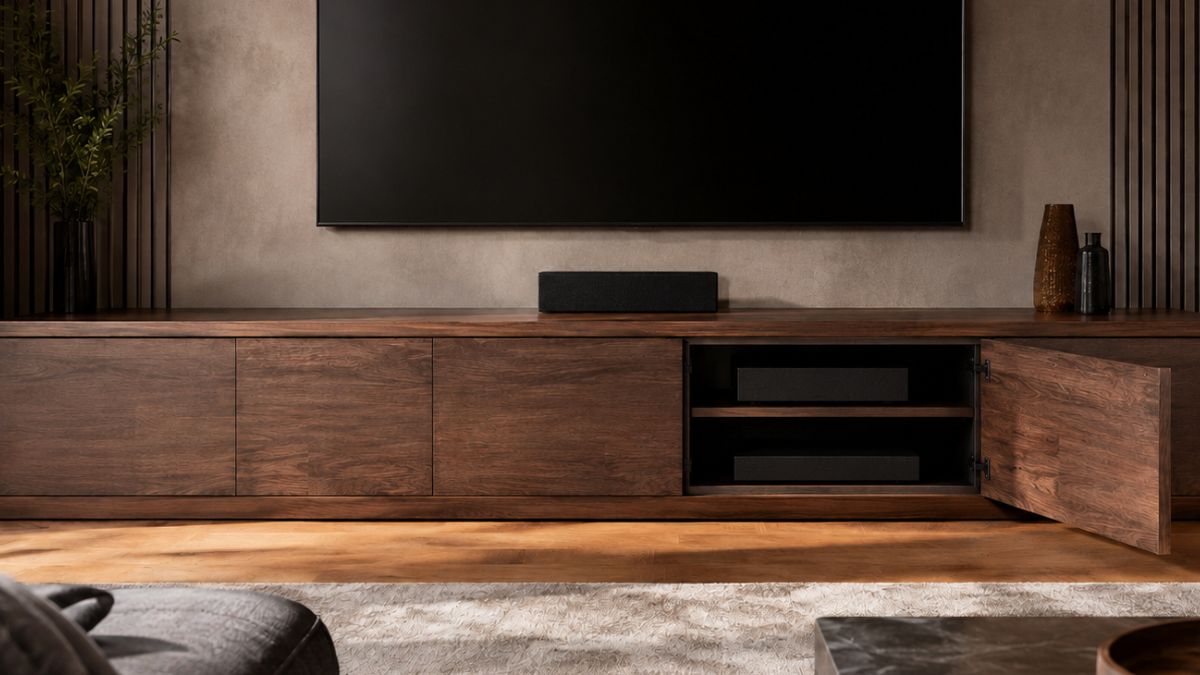
Many media consoles are sized for streaming boxes and game controllers, not full-size receivers, amplifiers, or large bundles of cable. A cabinet can look generous from the front while leaving too little usable depth behind the doors.
Depth affects more than fit. Electronics need room for connectors, bend radius, airflow, access, and future replacement. Planning all five prevents the cabinet from becoming an expensive obstacle.
An extra deep TV stand designed with an 18.3-inch internal depth, adjustable bays, rear vents, slatted doors, and multiple cable holes illustrates the complete approach. The goal is not simply to hide equipment, but to house it without blocking signals or trapping heat.
Measure the Equipment, Then Add Working Space
Start with the deepest component, including knobs, speaker terminals, and attached connectors. Manufacturers often publish chassis depth without the cable plugs that extend several inches beyond the rear panel.
Add space for the cable to curve without strain. A tight bend can pull on a port, loosen a connection, or prevent the cabinet door from closing. Record width and height too, because ventilation gaps are part of the equipment footprint.
Use Internal Dimensions, Not the Exterior Alone
An exterior depth includes doors, back panels, trim, and structural framing. The usable shelf can be meaningfully smaller, so product width and depth should never substitute for internal-compartment measurements.
Ask for the clear opening at the door and the shelf depth behind it. A receiver that fits inside may still be impossible to angle through a narrow opening. Removable or adjustable shelves can solve some conflicts, but only when their positions are documented.
Plan Passive Airflow Around Heat Sources
Receivers and amplifiers release heat during normal use. Leave space above and beside them according to each component maker’s guidance, and avoid stacking warm devices when the upper unit blocks the lower unit’s vents.
Slatted doors and vented rear panels can support air movement without leaving every component exposed. Check that the cabinet does not sit flush against a wall where rear vents have no path to release warm air. Cables should not form a dense curtain across openings.
Confirm Remote and Wireless Access
Solid doors can block infrared remote signals. Slats, glass, or an external IR repeater may allow hidden equipment to remain controllable, but performance depends on door material and the location of each receiver window.
Test the remote from the normal seating position after installation. Wireless controllers also deserve testing because dense equipment, metal cases, and cabinet placement can affect reception. Do not wait until every cable is tied down to discover a signal problem.
Create a Cable Route Before Connecting Anything
Sketch the signal path from source devices to receiver, television, speakers, network, and power. Assign each rear opening a purpose so power and low-voltage cables do not become an unplanned knot.
Use labels at both ends of every cable. Leave a modest service loop so a component can slide forward for maintenance without unplugging immediately. Too much spare cable adds clutter and can restrict airflow, so route the extra length beside rather than behind hot equipment.
Separate Everyday Access From Rare Access
Controllers, headphones, and charging leads need a reachable home. Calibration microphones, manuals, spare remotes, and old adapters can sit farther back because they are used less often.
Use the front drawers or outer cabinets for frequent items, and reserve the deeper adjustable bays for electronics. This arrangement reduces the temptation to stack small objects on warm equipment or leave doors open during every movie night.
Match Console Width to the Screen and Wall
A console should visually support the television without appearing pinched beneath it. Many rooms benefit from a cabinet that extends beyond the screen on both sides, but the right width also depends on doors, speakers, and traffic paths.
The referenced design is offered in several exterior widths, which can help match different screens and rooms while keeping the same deep cabinet concept. Tape the proposed outline on the wall and floor before choosing a size.
Account for Speakers and Vibration
Center speakers need a clear acoustic path. If one sits inside the console, confirm that the opening is large enough and that a door or decorative slat will not alter the sound in an unwanted way.
Keep turntables and sensitive components away from strong speaker vibration. Stable shelves, proper speaker isolation, and careful placement matter more than adding decorative objects. Do not place a subwoofer inside a cabinet unless its manufacturer specifically supports that arrangement.
Use Lighting Without Hurting the Screen
Interior lighting can help users see controls and can display equipment through slatted or glass doors. Adjustable brightness is useful because the best level for setup may be too bright during a film.
Check for reflections on the television from the normal seat. If the cabinet offers several brightness levels, choose the lowest one that provides the desired effect. Keep wiring for lights separate from ventilation paths and service loops.
Plan Delivery and Final Assembly
Deep consoles are often heavy because they use more material and must support substantial equipment. Compare package weight and dimensions with the route from the building entrance to the room, then arrange two-person handling when recommended.
A largely assembled cabinet with only legs to attach can reduce setup time, yet it also arrives as a large rigid object. Measure turns and stair landings with the carton dimensions. Protect the floor before tilting the unit during leg installation.
Build for the Next Component
Leave one adjustable bay or a portion of one shelf available for future gear. Home theater systems change, and replacing a receiver should not require replacing the entire console because the new chassis is slightly deeper.
Buy based on measured internal space, airflow, access, and cable management. When those systems are planned first, the furniture can keep the room composed while the electronics remain safe and serviceable.
Document the Finished Installation
Photograph each connection and cable route before pushing the console into its final position. Save the images with a short equipment list that records model names, input assignments, and the drawer or bay containing each accessory.
This record reduces guesswork when a device is replaced or a signal fails. It also helps another household member reset a cable without pulling every component forward. Update the notes whenever equipment moves so the deep cabinet remains organized after the first installation.

A broken streetlight may seem like a small neighborhood problem. But it can change what a home is worth.
In 2016, New York City tested how much lighting could change a community. Researchers added temporary streetlights to 39 public housing developments and left 38 similar areas unchanged. The result was as expected: nighttime outdoor crime fell by 36% in the areas with better lighting.
Buyers may not consider streetlights or sidewalks listed as home features, but they still factor them into their decisions. For instance, a one-point Walk Score increase near the top of the scale (79 to 80) adds more than $7,000 to the home value.
A home’s value is shaped by more than its size or upgrades. The streets around it matter too. A well-lit walkable neighborhood can make buyers feel more confident and create a sense of safety and trust.
The 4-to-1 Return on Visible Infrastructure
The financial impact of neighborhood safety extends beyond streetlights alone. The NYC lighting study revealed a recurring pattern: investments in visible, well-maintained infrastructure can create measurable economic value.
Researchers found that permanent public lighting costs about $200,000 per housing complex annually. It also avoids roughly $770,000 in social costs from reduced nighttime crime.
This 4-to-1 return shows how safety investments can create lasting value. When neighborhoods feel well cared for, buyers feel more secure living there.
The Real Estate Premium Behind Higher Walk Scores
A higher Walk Score doesn’t naturally translate into the same price increase everywhere. In high-demand neighborhoods, even a small improvement in walkability can add thousands to home values. In lower-demand areas, the same raise may have a smaller impact.
Redfin’s analysis found that highly walkable homes in Boston sell for a 29% premium, or about $140,724 more, compared with similar car-dependent properties. The reason is simple: walkable neighborhoods are rare. Only 4% of US real estate listings qualify as a “walker’s paradise,” which creates a strong competitive advantage. Buyers looking for new construction homes for sale in these neighborhoods often act quickly whenever a property becomes available.
Why Buyers Trade Space for Walkability
This growing demand for walkable neighborhoods has changed what buyers value in a home. NAR’s 2023 Community and Transportation Preferences survey found that Americans prioritize walkability, sidewalks, and nearby shops above secondary factors like highway access when picking a place to live.
85% of the survey’s respondents said sidewalks and places to walk are important. More than half said they’d take a smaller yard over a bigger one if it meant they could walk to nearby destinations.
Real estate platforms like Houzeo, Zillow, and Realtor.com allow sellers to list these exact neighborhood details. Sellers can highlight features such as walkability, lighting, and sidewalk access before making a decision.
How Buyers Price Neighborhood Safety
Academic research offers insight into how buyers price perceived safety risks. A landmark study by Leigh Linden and Jonah Rockoff found that homes located within 0.1 miles of a registered sex offender sell for about 4% less. That represents an average of roughly $5,500 compared with similar homes farther away.
These concerns reflect a broader gap in how Americans experience neighborhood safety. Gallup’s safety research found that fear of walking alone at night is much higher among women (53%) than men (26%). This 27-point gap shows that safety perceptions can vary significantly across demographics.
Concern is higher among lower-income households than higher-income groups. City residents also report higher levels of fear than people who live in suburban or rural areas.
Buyers now look beyond listing photos to understand the reality of a neighborhood. Platforms like Houzeo help buyers acquire more information about the area around their chosen property through safety data and walkability scores. This enables them to make better-informed decisions before they submit an offer.
The New Formula for a Desirable Neighborhood
A desirable neighborhood is no longer defined by home size alone. People look at the streets, sidewalks, and public spaces around a property before accepting an offer.
Safety matters. Gallup’s global safety data shows that 40% of Americans, the most in three decades, say they fear walking alone at night within a mile of their home. As safety becomes a key measure of quality of life, cities face greater pressure to create public spaces that feel secure and accessible.
The takeaway from the NAR survey is simple: buyers are not only paying for what exists inside a home. They also consider what surrounds their home. Well-maintained streets, well-lit streets, and walkable spaces can turn an ordinary block into a more desirable one.
-

 BLOG1 year ago
hanime1: The Ultimate Destination for Anime Lovers
-

 ENTERTAINMENT1 year ago
Sflix: How It’s Changing the Way We Watch Movies and TV Shows
-

 BILLS1 year ago
Why Does My Instagram Reel Stop Getting Views After One Hour? How to Fix It?
-

 BLOG1 year ago
Imginn: The Ultimate Tool to View Instagram Content Anonymously
-

 ENTERTAINMENT1 year ago
Crackstreams 2.0: The Future of Free Sports Streaming?
-

 BLOG1 year ago
NHentai.nef: Understanding the Popular Hentai Archive
-

 BLOG12 months ago
ThisVid: What Makes It Stand Out in the World of Online Videos
-

 Technology1 year ago
GLAADVoice.com: How You Can Get Involved and Make a Difference